dBASE Plus – Help Window
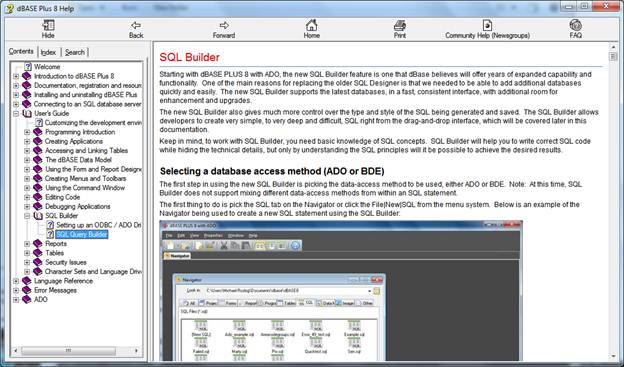
The dBASE Plus Online Help is a single dialog window that has many areas of interaction and content display. The interface is designed to make it easy to find and use information about the product.
 Main
Topic window
Main
Topic window
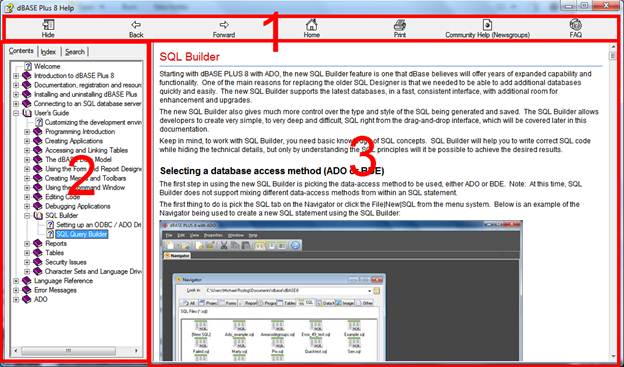
The main page is broken down into 3 major parts:
Areas of help
The first area (1) of interaction is the new toolbar:

Help Menu
Hide; pressing the toolbar button will hide the Topic group window, once pressed; the icon will change to say Show.
Back;
pressing the toolbar button will navigate “back” to the prior topic. This
works the same as normal web browser.
Forward;
pressing the toolbar button will navigate “forward” to a topic, after
a “back” operation has been completed
Home;
pressing the toolbar button will open the dBASE Knowledge base inside
the content pane (3)
Print;
this will print the current contents of the content pane (3)
Community
Help (Newsgroups); pressing this toolbar button will open the dBASE
newsgroups in the content pane (3)
FAQ; pressing the toolbar button will open the dBASE Frequently Asked Questions (FAQ) in the content page (3)
The second (2) area of interaction is the Topic Group Window
|
|
|
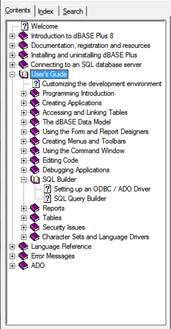
Each of the above tabs allows you to located information about a specific topic.
· Content
display;this will organize the information in a book/chapter display. This
interface allows you to drill-down into a book, then into it chapters
to find the information on dBASE Plus .
· Index
display;this is an entire list of index words from the search, type
in a starting word or phrase and the index will be scanned to find that
word or phrase about dBASE Plus .
· Search word display; this is a free form world search and the interface allows for the typing of a word or phrase about dBASE Plus and will return the relevant items.
The final area to bring attention to is the Content page (3):
Content pane
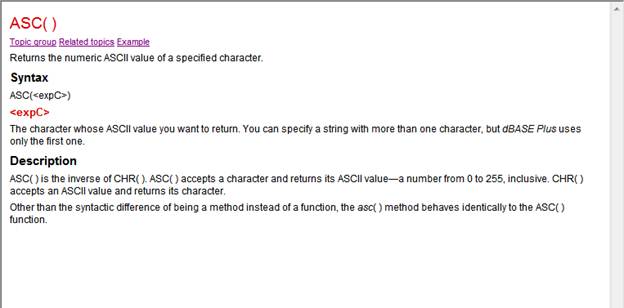
Several areas of the content page (3), displayed above, have popup descriptions. Move the cursor over a desired item and click to see its description.
Group topics
Help topics are grouped according to functionality, with the "group" roughly coinciding to the books in the Table of Contents. Clicking the Topic grouplink will take you to the page that covers that topic.
Note: The Topic group window does not automatically synchronize with the Main topic window. Once the Topic group window has been displayed, navigating in the Main Topic window to a topic outside the current topic group has no effect on the Topic group window.
Related topics
As the name implies, the Related topics hotspot
displays a window listing other topics of interest. Click the
Display button to view the information. Click the Cancel button
to go back to the help system.
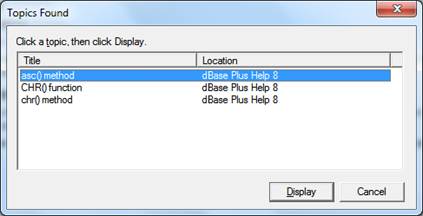
Related Topics Dialog
Example links
Many topics include examples that can be accessed from the Example hotspot in the content pane (3). When the Example link is click the example will be displayed:
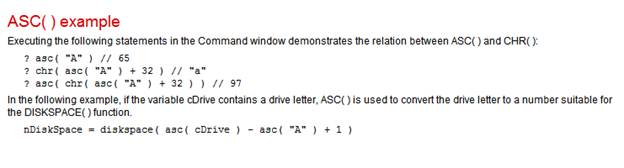
Example in the Conent pane (3)
For a list of typographical conventions used in this Help System, see dBASE Plus documentation.
IMPORTANT NOTE:
In the new, Help system for dBASE Plus , the ability to go directly to the Knowledgebase, Newsgroups, and FAQ from within the help. These new features were added to make it easier and faster to get to needed information without having to leave the standard help system.
On some websites, the following error may occur:
This error is displayed because of some of the limited features of the included Web Browser found inside the Help system. Click the Yes button to continue, there are no issues, just a warning that a particular variable in the JavaScript could not be found. The contents of the page should render with no uses.
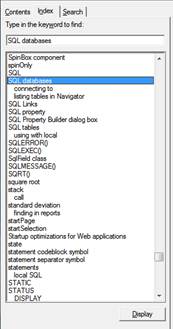 Index
display
Index
display 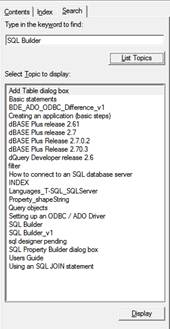 Search
word display
Search
word display