
Menu
Forms / Reports / Form Object issues
Issue #1734Fixed inserting of template characters when formatting entryfield value when function code “I” – Center is used
Issue #1459Fixed checking/unchecking menu item when menu is attached to _app.framewin
IDE
Issue #1901Fixed – Pasting component on scrolled form no longer sets top to a negative value.
Issue #1954Fixed – components in form in designer change position when moving components below the bottom of the form upwards
Issue #1960Fixed streaming of report’s superclass into CLASS statement when report is based on a custom report class and user runs report and then switches to design mode
ADO
Issue #1957using numbered parameters causes invalid subscript reference.
BDE dBASE table issues
Issue #1956Fixed streaming of datetime query parameter value to stream with curly braces instead of double quotes
Forms / Reports / Form Object issues
Issue #1923Fixed – listview in .exe with built in runtime (RTEXE) does not show groups as long as the app.exe.manifest file is included with the app.exe and is making sure to include version 6 common controls. the ListView object on a form will show the groups.
Issue #1935Fixed Entryfield Function and Picture properties so that when they are modified they invalidate control’s window instead of recreating the window (which was incorrectly changing position of control window when form has been scrolled vertically)
Issue #1930Fixed setting superclass for report in report designer when reloading designer after editing event handler in source editor
Issue #1921Fixed disappearing numerals when using a picture setting of ’99’ on an entryfield
IDE
Issue #1931Fixed typo: “roperty” to “Property” in context menu for Inspector for Field within Table Designer when designing a level 7 dbf file.
Issue #1940Fixed – Preprocessor setting in Project Explorer doesn’t get compiled.
Issue #1939Fixed – report streaming code is removing an added object to a report based on a crp – Fixed Report Designer reloading report’s superclass instead of its class after editing event handler in source editor
Issue #1877Fixed MAV (on Win 10) when reloading Report Designer after editing event handler for Report Component
Issue #1942Fixed problem causing linkage for new event handler to be lost when closing source editor and switching back to report designer_mediator
Issue #NoneCorrected Translation of text string in Spanish version of Source Editor Settings dialog
Issue #1945Fixed – Add IDE element to Project Explorer to allow user to add preprocessor directives.
dBugger
Issue #1922Debugger – Fixed ability to edit and use breakpoint expressions
Issue #1922Fixed Save and Load of Breakpoint settings to and from plusdebug.ini to correctly handle file paths with embedded commas, conditions with embedded commas, and global breakpoints.
Issue #1916Fixed – ADO params using the same parameter reference twice does not work.
Issue #1932Fixed ? command so it correctly retrieves and formats data from a MySQL LongText field
Miscellaneous Function Issues
Issue #1875Added code to ensure all timers are stopped and released early in dBASE shutdown sequence fixing windows error on program exit.
ADO Object Issues
Issue #1914Fixed – get crash in ADO app using rowset.applyfilter()
Issue #1893Fixed – additional changes to ADOChapter and GridEx to handle changes to adorowset.filter and adorowset.applylocate()
Auto Complete
Issue #1913Fixed – dComplete – Typing: use tablename order indexname triggers a Database Engine Error
Forms / Reports / Form Object issues
Issue #1872Fixed – Navigating to a boolean / logical field in a .exe with built in runtime causes crash
Issue #1904Fixed – Listbox cursor does not highlight the choice made by typing. Revised Previous Fix for Issue #1893
ADO Object Issues
Issue #1899Fixed – Data Type Mismatch error using a parameter value greater than 9 digits for numerical data. ADO Parameter value property was not handling 64 bit integer values
IDE
Issue #1903Fixed – Inspector dropdown is empty for a Grid column editor’s EditorType when running dBASE without a manifest file (and other multiple choice dropdown lists)
Issue #1905Fixed – Crash in source editor trying to add code to form using multiple other custom files. this also includes a fix to a crash when typing in the command window when certain custom files are in memory.
Issue #1909Fixed – crash putting qbdemgr.cc and other custom files in memory.
Issue #1910Fixed – In Command Window, when typing var = new, autocomplete class list may include classes that are not loaded into memory
Miscellaneous Function Issues
Issue #1906Fixed – STR() is not producing an error when evaluating a string
Forms / Reports / Form Object issues
Issue #318Fixed initial display of columnCheckBox when in the leftmost column of a grid so that check boxes are painted in the correct vertical position
Issue #1879Numerous numeric formating codes do not work in function property (in Entryfield, SpinBox, Text, ?, and Transform())
Issue #767Fixed – Picture setting of 99999999 does not allow you to add data to existing data in Entryfield
Issue #1885Fixed – Rightmost decimal digit dropped when editing numeric data with function set to “($”
IDE
Issue #1854Fixed code streaming of form.top and form.left when form is moved within the Form Designer using the mouse and form is subclassed from a custom form class.
Issue #1851Changed text color in debugger tool windows to higher contrast
Issue #1864Fixed – Navigator Look-In Field – Hotkeys for Cut, Copy, & Paste do not work
Issue #1889Fixed BUILD FROM so building with embedded runtime works
Issue #1865Fixed – Source editor tab control does not show list of files that go past the right end of the window. Now Source Editor will display a down arrow button at the right end of the tab control. When pressed a popup list of all open Source Editor tabs will display.
In addition, when the Find in Files Output Pane is visible, the same kind of button will appear allowing the user to choose any of the open search result tabs.
Issue #1878Fixed MAV when pressing Ctrl+P in Source Editor window within dBASE Debugger (plusdebug.exe) or when pressing Print button on Debugger’s toolbar.
Issue #1886Fixed – When Syntax Highlighting is off commented out code is not italicized. But, does temporarily show italics right after commenting out code. Now no italicizing or color changing occurs if Syntax Highlighting is turned off.
Issue #1895Fixed – Calculated field is not showing in a report in design mode
Issue #1900Fixed – Application .exe built with embedded runtime contains version info from plusrun.exe.
dComplete
Issue #1858Fixed crash in Command window doing simple a = or b =
Issue #1881Fixed – dBASE locks up in Source Editor when typing FOR statement
Issue #1882Fixed – AutoComplete not listing custom form properties
Issue #1883Fixed – Autocomplete not loading class from SET PROCEDURE file (when statement is between CLASS and ENDCLASS)
Issue #1888Fixed – AutoComplete cannot identify class of array created with curly braces (a Literal Array)
Data Objects and Functions
Issue #1221Fixed – ‘Data Type Mismatch’ error checking EMPTY() for *******NaN and *******Inf. Updated Empty() to return False for *********Nan and *********Inf values.
DBF Table Issues
Issue #692Fixed – not updating field when attempting to replace a numeric field value with an integer exceeding size that fits to left of decimal point. Will still trigger a ‘value out of range’
ADO Object Issues
Issue #1893Fixed – Get crash in ADO app using rowset.filter (and changing filter in a form component’s event handler).
Issue #1490Fixed – MAV when doing calculation on Firebird numeric data.
Miscellaneous Function Issues
Issue #551Fixed – Number object’s toString() method is returning Scientific notation when it doesn’t need to
Issue #1026Fixed – Transform() without 9s in numeric mask adds extra spaces to result
Issue #1491Fixed – Number class drops decimals after it’s value gets set to 0
Issue #1857Fixed – Increment operator when used to pre-increment a variable, i.e. result = ++var
New Feature
Added new dBASE Function: SetEnv() – Creates or updates environment variable
The syntax for SetEnv() is: setenv( <Env.Var expC>, <Value expC>)
where <Env.Var expC> is the name of the environment variable and <Value expC> is the character string value to assign to it
Returns True if successful, False if unsuccessful
SetEnv() can create a new environment variable or change the value assigned to an environment variable or delete an existing an environment variable. SetEnv() updates a private copy of the environment variables that are visible to dBASE or to a dBASE application. It does not update the environment for any other process.
Examples:
To create or update an environment variable: SetEnv(“myAppPath”, “C:somedir”)
sets environment variable myAppPath to C:somedir
To delete an existing environment variable, pass an empty string as the second parameter for example: setenv(“myvar”, “”)
deletes environment variable: myvar
Forms / Reports / Form Object issues
Issue #1842Fixed – MAV opening a form containing listboxes
Issue IDE
Issue #1841In Table Designer – Inspector is not displaying table properties
Issue #1844dComplete – Lockup typing “Set Procedure To”
Issue #1484Fixed – regression in REPLACE ALL to update status bar with # of replacements
Issue #1599Fixed – Shift+Tab in large file takes too long – seems to hang dbase
Issue #1830Fixed – inspector and other palettes will not show automatically in design when a form is maximized.
Issue #1753Fixed – Long delay when typing in Source Editor with large file and autocomplete enabled
Issue ADO Object Issues
Issue #1839Fixed – dBASE crash with ADO (firebird) app in 10.1.0.0 (crash does not happen in 10.0.0.1)
Issue #1784Fixed – Upgraded streaming engine to support correct streaming of the ADO Parameters array and other arrays that work the same way
Issue #1494Fixed – passing params to ADOQuery to update/insert a table pads spaces and does not allow blank values. Fixed the pad spaces part – did not fix the allow blank values part as that appears to depend on database server settings
Issue #1843Fixed – length being streamed out for ADO parameter when it should not. Updated ADOParameter class so it only streams out the length property in the following situations: For character string: For Input or Input/Output If length is different from actual parameter value length For Output or Return Value: Always For Other Data Types: If length is different from default length for Data Type
And for above cases if parameter is not set to be readonly
Changed adoparameter.value so it streams AFTER other properties except for Length and DecLength
Changed default length for character parameters to 0 instead of 20
Issue #1852Fixed – Streaming adoQuery parameters with length set – erases .value property
dComplete
Issue #NoneFixed – dComplete – typing: form.adoquery1.rowset. would not bring up option list.
Issue #1836dComplete – form.rowset.fields[ not showing fields list
Issue #1850Fixed -‘this.’ and ‘form.’ did not bring up any dComplete (Code completion) for any form objects
Forms / Reports / Form Object issues
Issue #1769Fixed – Recursive paints for transparent form components when form.doubleBuffered = true. Fixed – Image painting is improved so it doesn’t overwrite overlapping transparent components when its behind those components in the z-order Fixed – painting of ListBox background when ListBox.transparent = true
Issue #1790Fixed – Transparent Image in Container not painting correctly
Issue #1789Fixed – Transparent Image does not show overlapped objects behind it
Issue #1793Fixed – Grid.cellFocusBorderStyle not working reliably
Issue #1769Fixed – form.doubleBuffered causing high CPU usage
Issue #1761Fixed – Report rendering issue – getting error 258 Method not available on Object BOOKMARK in db9 and db10
IDE
Issue #1792Fixed – AutoComplete offering options for parent object when child object not found
Issue #1788Fixed – Debugger – Missing View menu options for source code window Also fixed: Line Numbers are also NOT showing up in the status bar – making it very difficult to tell the current line number within the debugger
Issue #1787Fixed – editor tree selection colours are too muted when not focused
Issue #1785Fixed – Missing image crashes dBASE™ When clicking ‘cancel’ in error dialog.
Issue #1803Fixed – Watch list doesn’t mark objs as expandable when first added
Issue #1808Fixed – KEYBOARD Command not working properly in new command window editor
Issue #1809Fixed – Have cursor stay at last item instead of going to the bottom after a search returns 0 results
Issue #1800Fixed – Command window input pane not coming back after running small app with menu
Issue #1805Fixed – icon files containing multiple png images were not supported by the ICON clause of the BUILD command.
Issue #1807Fixed – get variable undefined trying to copy and paste a grid with defined columns
Issue #1810Fixed- dbgr locals/watch listings now default to sort-by-name
Issue #1816Fixed – autocomplete system doesn’t maintain ref-counts – Code Completion ActiveX issue
Issue #1819Fixed – dBASE™ Crashes trying to use exportdata.wfm in duflp
Issue #1823Slightly improved behavior of Call Stack window (to resize columns to zero less often) by removing LVS_EX_AUTOSIZECOLUMNS extended style from ListView control used within Call Stack window.
Issue #1822Fixed – Find in File dialog’s Search In field is overriding user typed folder when it partially matches previous search folder. Fixed same problem with File Types fieldIssue #1824Fixed – Some debugger edit menu shortcut keys did not work: Ctrl+F, Shift+Ctrl+F, Ctrl+G
ADO Object Issues
Issue #1698Fixed ADO Table Designer: Invalid Argument errors when attempting to enter field definitions
Issue #1784Fixed parameter issue. designer streams out parameter with wrong value and with signed property for numeric parameter
Issue #1814Fixed – ADO multiple params with LIKE not working
Issue #1815Fixed – Adding .sql file with ado connection produces ‘requested properties cannot be supported’ error
Issue #0731Fixed – criteria generated to use in Find() for adorowset.lookupsql when performing lookup from code to find display value or the reverse, lookup from display value to find code. Limited criteria to a single comparison as that is all ADO supports in the RecordSet Find method.
Issue #1813Fixed – Crash in db10 when running app with embedded runtime and ADO connectionActiveX
Issue #1335Fixed – ability to run Crystal Reports Report Viewer ActiveX Version 11 from within dBASE™ PLUS (both IDE and Runtime Application)
NEW FEATURES
Forms / Reports / Form Objects
Issue #1769Added Image.transparent property to enable Image to be handled correctly when doubleBuffered is true
Forms / Reports / Form Object issues
Issue #1750Fixed – Running Web Wizard a second time produces MAV
IDE issues
Issue #1768Fixed – Cannot select items inside a rectangle in designer
Issue #1773Fixed – MAV from autocomplete when typing: “use customer.dbf order ” than backspacing and typing space
Issue #1759Fixed – Inspector’s right upper drop down arrow was causing a crash.
Issue #1779Fixed – RadioButton value getting changed when toggling transparent property (or any other property).
Issue #1778 – 1781Fixed – Designer doesn’t explicitly deselect ctrl before deletion. get ‘Attempt to access released object’ or Crash after deleting gridEx object
Issue #1774Fixed – Project Explorer: Boom when using non-fancy graphics in Win7
Issue #1762Fixed – Error when trying to run in Windows Vista SetThreadErrorMode is enabled w/ WINNT = Vista, but avail only in 7
Issue #1763Fixed – MAV with ‘clear fields’
Miscellaneous issues
Issue #1757Fixed – Fixed regression in arithmetic operators: -=, *=, /=, %= that caused data type mismatch or unexpected type errors when left hand side of assignment was an object property
Forms / Reports / Form Object issues
Issue #1750Fixed – running Web Wizard a second time produces MAV
Issue #1614Fixed – images do not get streamed in HTML report
Issue #527Fixed – Regression to issue #479 – now Designer is removing params reference. 15
Issue #771Fixed – Upgrade application stub (PLUSstub.bin) to build and work under MSVS 2012 build
Issue #700Fixed – Error: Symbol table space exhausted when compiling large application
DBF Table Issues
Issue #1656Fixed – changing field type from numeric 10,4 to numeric 10 only removes a full digit
ADO Object Issues
Issue #1665Fixed – adoDatabase/adoQuery not handling table name with dollar sign
Issue #1636Fixed – invalid argument for value error with ADOQuery insert statement where parameters that have values wiith @ and other signs produce an invalid argument error
Miscellaneous Function Issues
Issue #1621Fixed – str() failed to trim the results for some functions. c = str(90, 10, 0, “”) ?ltrim(c)
Issue #1610Fixed – Missing init for variable within implementation for function procRefCount()
Issue #1503Fixed – windows version info using os(). OS() function should return “Windows NT version 6.03”
NEW FEATURES
Form / Form Objects
Issue #1675Fixed – Grid: Give the grid a focus indicator like other controls (radiobuttons, etc.) – New grid property is called ‘cellFocusBorderStyle’ and allows the programmer to give the current field that has focus a particular style to distinguish it from the other fields.
Issue #1638Fixed – GridEx: Implement GridEx class based on Ultimate Grid
Issue #1566Fixed – Shape component now has a SpeedTip property to allow for speed tips.
IDE
Issue #1746Fixed – new BDE User alias – added a new user BDE Alias called ‘webTemp’ which will point to PATH:C:Users[username]DocumentsdBASEPLUS10Webtemp
Issue #1600Fixed – Add BUILD command option to turn off loading of BDE in built application .exe. new BUILD command option BDE OFF Instead of requiring the use of an .ini file setting, [DataEngine] DefaultEngine=None
Issue #1595Fixed – Resource Handling – added PNG
Issue #1527 to #1529Fixed – WebWizard.ini file location and function changed. WebWizard ini file can now be found in the usersAppDataLocaldBASEPLUS10WebWizardINI directory
Issue #1516Fixed – add image editor to dBASE™ PLUS. Added FotoGrafix to the root dBASE™ install directory.
dComplete
Issue #1652Fixed – Upgrade AutoComplete to recognize variables set via the STORE command
Issue #1651Fixed – Upgrade AutoComplete to recognize properties events or methods for objects defined in another form or custom file
Issue #1649Fixed – Upgrade AutoComplete to add functions, procedures, and variables found via set procedure/set library/#include to option list when entering expressions
Issue #1644Fixed – Upgrade AutoComplete to support selecting FORM and THIS from option list
Issue #1643Fixed – Upgrade AutoComplete to add classes found via set procedure/set library/#include to option list after new
Issue #1147Fixed – Implemented Scope checking. if the variable is not found as a defined object in the current function/procedure then the first one found in the code (from the top) is used to supply the list.
Issue #1146Fixed – Implemented field object lists for code completion. If using the command window or with a Form in design mode. When writing code for a database object and drilling down to the field list.
The field list will now show in dComplete.
Issue #1130Fixed – obj.parent will now show the list of the parents properties, events and methods in dComplete.
Issue #1125Fixed – Upgraded dComplete to load and search other source files for superclass definitions
[/toggle][toggle title=”dBASE™ PLUS 10 – ALL FIXES”]Issue #0318Fixed initial display of columnCheckBox when in the leftmost column of a grid so that check boxes are painted in the correct vertical positionIssue #0527Fixed – Regression to issue #479 – now Designer is removing params reference. 15
Issue #0907Fixed – ‘bottom of file has been reached’ dialog is missing from search dialog.
Issue #1026Fixed – Transform() without 9s in numeric mask adds extra spaces to result
Issue #1125Fixed – Upgraded dComplete to load and search other source files for superclass definitions
Issue #1130Fixed – obj.parent will now show the list of the parents properties, events and methods in dComplete.
Issue #1146Fixed – Implemented field object lists for code completion. If using the command window or with a Form in design mode. When writing code for a database object and drilling down to the field list.
The field list will now show in dComplete.
Issue #1147Fixed – Implemented Scope checking. if the variable is not found as a defined object in the current function/procedure then the first one found in the code (from the top) is used to supply the list.
Issue #1148Fixed – if some code exists already in a do while, do until, for , if , case etc.. code completion does not work
Issue #1221Fixed – ‘Data Type Mismatch’ error checking EMPTY() for *******NaN and *******Inf. Updated Empty() to return False for *********Nan and *********Inf values.
Issue #1309Fixed – Restart (Find / Replace) after hitting the end of a file (f3 multiple times)
Issue #1335Fixed – ability to run Crystal Reports Report Viewer ActiveX Version 11 from within dBASE™ PLUS (both IDE and Runtime Application)
Issue #1459Fixed checking/unchecking menu item when menu is attached to _app.framewin
Issue #1484Fixed – regression in REPLACE ALL to update status bar with # of replacements
Issue #1490Fixed – MAV when doing calculation on firebird numeric data.
Issue #1491Fixed – Number class drops decimals after it’s value gets set to 0
Issue #1494Fixed – passing params to ADOQuery to update/insert a table pads spaces and does not allow blank values. Fixed the pad spaces part – did not fix the allow blank values part as that appears to depend on database server settings
Issue #1499Fixed – after copying lines of code in the command window. Cannot run the lines individually because they disappear
Issue #1500Fixed – file | Print crashes on second attempt to print a form
Issue #1501Fixed – Relax or remove limits in dBASE™ Compiler and/or dBASE™ Object Code file format. Exceeding one or more of these limits currently triggers one of the following errors: “Too many UDF/PROCEDUREs defined in program” “Too many symbols in this module” “Program too big to compile”
Issue #1503Fixed – windows version info using os(). OS() function should return “Windows NT version 6.03”
Issue #1510Fixed – MAV when typing “with (” in .wfm in Source Editor
Issue #1516Fixed – add image editor to dBASE™ PLUS. Added FotoGrafix to the root dBASE™ install directory.
Issue #1527 to #1529Fixed – WebWizard.ini file location and function changed. WebWizard ini file can now be found in the usersAppDataLocaldBASEPLUS10WebWizardINI directory
Issue #1534Fixed – Often times when adding a new event handler via the inspector the new function is indented incorrectly
Issue #1566Fixed – Shape component now has a SpeedTip property to allow for speed tips.
Issue #1583Fixed – build app to app.exe UAC OFF – still adheres to UAC rules
Issue #1595Fixed – Resource Handling – added PNG
Issue #1596Fixed – DEO Search not finding search paths. The DEO search uses the current _app.inifile value.
Issue #1599Fixed – Shift+Tab in large file takes too long – seems to hang dbase
Issue #1600Fixed – Add BUILD command option to turn off loading of BDE in built application .exe. new BUILD command option BDE OFF Instead of requiring the use of an .ini file setting, [DataEngine] DefaultEngine=None
Issue #1610Fixed – Missing init for variable within implementation for function procRefCount()
Issue #1614Fixed – images do not get streamed in HTML report
Issue #1621Fixed – str() failed to trim the results for some functions. c = str(90, 10, 0, “”) ?ltrim(c)
Issue #1626Fixed – Releasing a tabledef does not release references to arrays used by it.
Issue #1627Fixed – t=new tabledef(new object()) followed by inspect(t) can cause GPF. Tabledef now increments ref.cnt on parent object during construction and decrement ref.cnt on parent object during destruction.
Issue #1629Fixed – MAV trying to set tabledef.tabletype
Issue #1630Fixed – tabledef causing gpf. Internally wasn’t handling the eDbNotifyDestroy notification signaling that the database object was about to be destroyed.
Issue #1636Fixed – invalid argument for value error with ADOQuery insert statement where parameters that have values wiith @ and other signs produce an invalid argument error
Issue #1638Fixed – GridEx: Implement GridEx class based on Ultimate Grid
Issue #1643Fixed – Upgrade AutoComplete to add classes found via set procedure/set library/#include to option list after new
Issue #1644Fixed – Upgrade AutoComplete to support selecting FORM and THIS from option list
Issue #1649Fixed – Upgrade AutoComplete to add functions, procedures, and variables found via set procedure/set library/#include to option list when entering expressions
Issue #1650Fixed – object properties do not show up in for loop for dComplete.
Issue #1651Fixed – Upgrade AutoComplete to recognize properties events or methods for objects defined in another form or custom file
Issue #1652Fixed – Upgrade AutoComplete to recognize variables set via the STORE command
Issue #1653Fixed – form designer removes blank lines
Issue #1656Fixed – changing field type from numeric 10,4 to numeric 10 only removes a full digit
Issue #1661Fixed – Container and notebook objects do not show their sub components in dComplete
Issue #1662Fixed – doing this.parent.parent on an object in a container or notebook (to end up referencing the form) does not show customer defined form objects in dComplete
Issue #1663Fixed – form event’s ‘this.’ reference does not show properties events etc… for dComplete
Issue #1665Fixed – adoDatabase/adoQuery not handling table name with dollar sign
Issue #1675Fixed – Grid: Give the grid a focus indicator like other controls (radiobuttons, etc.) – New grid property is called ‘cellFocusBorderStyle’ and allows the programmer to give the current field that has focus a particular style to distinguish it from the other fields.
Issue #1681Fixed – Code Hints cannot distinguish between command, function, method, or class versions of keyword
Issue #1685Fixed – Encountered an improper argument with applyLocate(). Error was due to accessing an array with an index of -1.
Issue #1698Fixed – ADO Table Designer: Fixed Invalid Argument errors when attempting to enter field definitions
Issue #1734Fixed inserting of template characters when formatting entryfield value when function code “I” – Center is used
Issue #1744Fixed – corrected datasource parser used to load icons in ListView, TreeView, and NoteBook Specifying an image resource will now work when specifying the type, for example: RESOURCE png/#123 RESOURCE ico/myicon somefile.dll
Issue #1746Fixed – new BDE User alias – added a new user BDE Alias called ‘webTemp’ which will point to PATH:C:Users\DocumentsdBASEPLUS10Webtemp
Issue #1750Fixed – Running Web Wizard a second time produces MAV
Issue #1750Fixed – running Web Wizard a second time produces MAV
Issue #1753Fixed – Long delay when typing in Source Editor with large file and autocomplete enabled
Issue #1757Fixed – Fixed regression in arithmetic operators: -=, *=, /=, %= that caused data type mismatch or unexpected type errors when left hand side of assignment was an object property
Issue #1759Fixed – Inspector’s right upper drop down arrow was causing a crash.
Issue #1761Fixed – Report rendering issue – getting error 258 Method not available on Object BOOKMARK in db9 and db10
Issue #1762Fixed – Error when trying to run in Windows Vista SetThreadErrorMode is enabled w/ WINNT = Vista, but avail only in 7
Issue #1763Fixed – MAV with ‘clear fields’
Issue #1768Fixed – Cannot select items inside a rectangle in designer
Issue #1769Added Image.transparent property to enable Image to be handled correctly when doubleBuffered is trueIssue #1769Fixed – form.doubleBuffered causing high CPU usage
Issue #1769Fixed – Recursive paints for transparent form components when form.doubleBuffered = true. Fixed – Image painting is improved so it doesn’t overwrite overlapping transparent components when its behind those components in the z-order Fixed – painting of ListBox background when ListBox.transparent = true
Issue #1773Fixed – MAV from autocomplete when typing: “use customer.dbf order ” than backspacing and typing space
Issue #1774Fixed – Project Explorer: Boom when using non-fancy graphics in Win7
Issue #1778 – 1781Fixed – Designer doesn’t explicitly deselect ctrl before deletion. get ‘Attempt to access released object’ or Crash after deleting gridEx object
Issue #1779Fixed – RadioButton value getting changed when toggling transparent property (or any other property).
Issue #1784Fixed – Upgraded streaming engine to support correct streaming of the ADO Parameters array and other arrays that work the same way
Issue #1784Fixed parameter issue. designer streams out parameter with wrong value and with signed property for numeric parameter
Issue #1785Fixed – Missing image crashes dBASE™ When clicking ‘cancel’ in error dialog.
Issue #1787Fixed – editor tree selection colours are too muted when not focused
Issue #1788Fixed – Debugger – Missing View menu options for source code window Also fixed: Line Numbers are also NOT showing up in the status bar – making it very difficult to tell the current line number within the debugger
Issue #1789Fixed – Transparent Image does not show overlapped objects behind it
Issue #1790Fixed – Transparent Image in Container not painting correctly
Issue #1792Fixed – AutoComplete offering options for parent object when child object not found
Issue #1793Fixed – Grid.cellFocusBorderStyle not working reliably
Issue #1800Fixed – Command window input pane not coming back after running small app with menu
Issue #1803Fixed – Watch list doesn’t mark objs as expandable when first added
Issue #1805Fixed – icon files containing multiple png images were not supported by the ICON clause of the BUILD command.
Issue #1807Fixed – get variable undefined trying to copy and paste a grid with defined columns
Issue #1808Fixed – KEYBOARD Command not working properly in new command window editor
Issue #1809Fixed – Have cursor stay at last item instead of going to the bottom after a search returns 0 results
Issue #1810Fixed – dbgr locals/watch listings now default to sort-by-name
Issue #1814Fixed – ADO multiple params with LIKE not working
Issue #1815Fixed – Adding .sql file with ado connection produces ‘requested properties cannot be supported’ error
Issue #1816Fixed – autocomplete system doesn’t maintain ref-counts – Code Completion ActiveX issue
Issue #1819Fixed – dBASE™ Crashes trying to use exportdata.wfm in duflp
Issue #1822Fixed – Find in File dialog’s Search In field is overriding user typed folder when it partially matches previous search folder. Fixed same problem with File Types fieldIssue #1823Fixed – Slightly improved behavior of Call Stack window (to resize columns to zero less often) by removing LVS_EX_AUTOSIZECOLUMNS extended style from ListView control used within Call Stack window.
Issue #1824Fixed – Some debugger edit menu shortcut keys did not work: Ctrl+F, Shift+Ctrl+F, Ctrl+G
Issue #1830Fixed – inspector and other palettes will not show automatically in design when a form is maximized.
Issue #1836Fixed – dComplete – form.rowset.fields[ not showing fields list
Issue #1839Fixed – dBASE crash with ADO (firebird) app in 10.1.0.0 (crash does not happen in 10.0.0.1)
Issue #1841Fixed – In Table Designer – Inspector is not displaying table properties
Issue #1842Fixed – MAV opening a form containing listboxes
Issue #1843Fixed – length being streamed out for ADO parameter when it should not. Updated ADOParameter class so it only streams out the length property in the following situations: For character string: For Input or Input/Output If length is different from actual parameter value length For Output or Return Value: Always For Other Data Types: If length is different from default length for Data Type
And for above cases if parameter is not set to be readonly
Changed adoparameter.value so it streams AFTER other properties except for Length and DecLength
Changed default length for character parameters to 0 instead of 20
Issue #1844Fixed – dComplete – Lockup typing “Set Procedure To”
Issue #1850Fixed -‘this.’ and ‘form.’ did not bring up any dComplete (Code completion) for any form objects
Issue #1851Changed text color in debugger tool windows to higher contrast
Issue #1852Fixed – Streaming adoQuery parameters with length set – erases .value property
Issue #1854Fixed – Code streaming of form.top and form.left when form is moved within the Form Designer using the mouse and form is subclassed from a custom form class.
Issue #1857Fixed – Increment operator when used to pre-increment a variable, i.e. result = ++var
Issue #1858Fixed – Crash in Command window doing simple a = or b =
Issue #1864Fixed – Navigator Look-In Field – Hotkeys for Cut, Copy, & Paste do not work
Issue #1865Fixed – Source editor tab control does not show list of files that go past the right end of the window. Now Source Editor will display a down arrow button at the right end of the tab control. When pressed a popup list of all open Source Editor tabs will display.
In addition, when the Find in Files Output Pane is visible, the same kind of button will appear allowing the user to choose any of the open search result tabs.
Issue #1872Fixed – Navigating to a boolean / logical field in a .exe with built in runtime causes crash
Issue #1875Added code to ensure all timers are stopped and released early in dBASE shutdown sequence fixing windows error on program exit.
Issue #1877Fixed MAV (on Win 10) when reloading Report Designer after editing event handler for Report Component
Issue #1878Fixed – MAV when pressing Ctrl+P in Source Editor window within dBASE Debugger (plusdebug.exe) or when pressing Print button on Debugger’s toolbar.
Issue #1879Numerous numeric formating codes do not work in function property (in Entryfield, SpinBox, Text, ?, and Transform())
Issue #1881Fixed – dBASE locks up in Source Editor when typing FOR statement
Issue #1882Fixed – AutoComplete not listing custom form properties
Issue #1883Fixed – Autocomplete not loading class from SET PROCEDURE file (when statement is between CLASS and ENDCLASS)
Issue #1885Fixed – Rightmost decimal digit dropped when editing numeric data with function set to “($”
Issue #1886Fixed – When Syntax Highlighting is off commented out code is not italicized. But, does temporarily show italics right after commenting out code. Now no italicizing or color changing occurs if Syntax Highlighting is turned off.
Issue #1888Fixed – AutoComplete cannot identify class of array created with curly braces (a Literal Array)
Issue #1889Fixed – BUILD FROM so building with embedded runtime works
Issue #1893Fixed – Get crash in ADO app using rowset.filter (and changing filter in a form component’s event handler).
Issue #1895Fixed – Calculated field is not showing in a report in design mode
Issue #1899Fixed – Data Type Mismatch error using a parameter value greater than 9 digits for numerical data. ADO Parameter value property was not handling 64 bit integer values
Issue #1900Fixed – Application .exe built with embedded runtime contains version info from plusrun.exe.
Issue #1901Fixed – Pasting component on scrolled form no longer sets top to a negative value.
Issue #1903Fixed – Inspector dropdown is empty for a Grid column editor’s EditorType when running dBASE without a manifest file (and other multiple choice dropdown lists)
Issue #1904Fixed – Listbox cursor does not highlight the choice made by typing. Revised Previous Fix for Issue #1893
Issue #1905Fixed – Crash in source editor trying to add code to form using multiple other custom files. this also includes a fix to a crash when typing in the command window when certain custom files are in memory.
Issue #1906Fixed – STR() is not producing an error when evaluating a string
Issue #1909Fixed – crash putting qbdemgr.cc and other custom files in memory.
Issue #1910Fixed – In Command Window, when typing var = new, autocomplete class list may include classes that are not loaded into memory
Issue #1916Fixed – ADO params using the same parameter reference twice does not work.
Issue #1921Fixed disappearing numerals when using a picture setting of ’99’ on an entryfield
Issue #1922Debugger – Fixed ability to edit and use breakpoint expressions
Issue #1922Fixed Save and Load of Breakpoint settings to and from plusdebug.ini to correctly handle file paths with embedded commas, conditions with embedded commas, and global breakpoints.
Issue #1923Fixed – listview in .exe with built in runtime (RTEXE) does not show groups as long as the app.exe.manifest file is included with the app.exe and is making sure to include version 6 common controls. the ListView object on a form will show the groups.
Issue #1930Fixed setting superclass for report in report designer when reloading designer after editing event handler in source editor
Issue #1931Fixed typo: “roperty” to “Property” in context menu for Inspector for Field within Table Designer when designing a level 7 dbf file.
Issue #1932Fixed ? command so it correctly retrieves and formats data from a MySQL LongText field
Issue #1935Fixed Entryfield Function and Picture properties so that when they are modified they invalidate control’s window instead of recreating the window (which was incorrectly changing position of control window when form has been scrolled vertically)
Issue #1939Fixed – report streaming code is removing an added object to a report based on a crp – Fixed Report Designer reloading report’s superclass instead of its class after editing event handler in source editor
Issue #1940Fixed – Preprocessor setting in Project Explorer doesn’t get compiled.
Issue #1942Fixed problem causing linkage for new event handler to be lost when closing source editor and switching back to report designer_mediator
Issue #1945Fixed – Add IDE element to Project Explorer to allow user to add preprocessor directives.
Issue #1954Fixed – components in form in designer change position when moving components below the bottom of the form upwards
Issue #1956Fixed streaming of datetime query parameter value to stream with curly braces instead of double quotes
Issue #1957using numbered parameters causes invalid subscript reference.
Issue #1960Fixed streaming of report’s superclass into CLASS statement when report is based on a custom report class and user runs report and then switches to design mode
Issue #NoneCorrected Translation of text string in Spanish version of Source Editor Settings dialog
Issue #NoneFixed – dComplete – typing: form.adoquery1.rowset. would not bring up option list.
[/toggle] [/accordion]During install dBASE installs the following directories to C:ProgramDatadBASEPLUS10
->Bin->dBLClasses -FormControls -Forms -NonVisual -ReportControls -Reports -Startup -ToolBars->Designer -Code -form -label -table->Include->Properties->Samples -ADO -Contax -Data -dtf -Examples -Lookup Data->Web -classes -messageserver -samples -cgi-bin -data -htdocs -source -temp -Wizards->WebWizardINI
During Startup of each new release:
the following folders are copied to the c:users[username]AppDataLocaldBASEPLUS10 directory…
->Bin->Designer -Code -form -label -table->WebWizardINI
the following folders are copied to the c:users[username]DocumentsdBASEPLUS10 directory…
C:.->bin -dblCore -temp->dBLClasses -FormControls -Forms -NonVisual -ReportControls -Reports -Startup -ToolBars->Include->Properties->Samples -ADO -Contax -Data -dtf -Examples -Lookup Data->Web -classes -messageserver -samples -cgi-bin -data -htdocs -source -temp -Wizards
During Install the media files get installed to the public documents folder : c:userspublicDocumentsdBASEPLUS10…
Media -Images -glyfx -Aero -CE -Dbase Aero -BMP -16×16 -128 -24×24 -128 -256×256 -128 -32×32 -128 -48×48 -128 -64×64 -128 -GIF -16×16 -24×24 -256×256 -32×32 -48×48 -64×64 -ICO -16×16 -24×24 -256×256 -32×32 -48×48 -64×64 -PNG -16×16 -24×24 -256×256 -32×32 -48×48 -64×64 -Image Guide -LE -Dbase Aero -BMP -256×256 -128 -32×32 -128 -48×48 -128 -64×64 -128 -GIF -256×256 -32×32 -48×48 -64×64 -ICO -256×256 -32×32 -48×48 -64×64 -PNG -256×256 -32×32 -48×48 -64×64 -Image Guide -SE -Dbase Aero -BMP -16×16 -128 -24×24 -128 -32×32 -128 -GIF -16×16 -24×24 -32×32 -ICO -16×16 -24×24 -32×32 -PNG -16×16 -24×24 -32×32 -Image Guide -XP -CE -dBase XP -BMP -16×16 -128 -24×24 -128 -32×32 -128 -48×48 -128 -64×64 -128 -GIF -16×16 -24×24 -32×32 -48×48 -64×64 -ICO -16×16 -24×24 -32×32 -48×48 -64×64 -PNG -16×16 -24×24 -32×32 -48×48 -64×64 -Image Guide -LE -dBase XP -BMP -32×32 -128 -48×48 -128 -64×64 -128 -GIF -32×32 -48×48 -64×64 -ICO -32×32 -48×48 -64×64 -PNG -32×32 -48×48 -64×64 -Image Guide -SE -dBase XP -BMP -16×16 -128 -24×24 -128 -GIF -16×16 -24×24 -ICO -16×16 -24×24 -PNG -16×16 -24×24 -Image Guide -Textures -Movies -RESOURCES[/toggle][toggle title=”Is Windows XP supported in dBASE™ PLUS 10?”]
NO, dBASE™ PLUS 10 is not designed to work on XP. Since Microsoft dropped support for the OS back in April we have followed suit. While there are still many users of XP, we are seeing a dramatic drop in the number of people using it.
It is never easy to drop support for a OS, especially one as popular as XP. However the resources needed to retrofit, recompile, retrofit, etc. makes it unfeasible to continue support more so when you know that if you hit a snag with the older compiler for instance, you can’t go to Microsoft for a fix.
So that puts us in an untenable position for a platform that is being rapidly phased out by organizations and individuals every day. That is why we made the difficult decision to drop support for Windows XP and Windows Server 2003 (server version of XP).
[/toggle][toggle title=”Are dBASE™ PLUS 9.X projects forwardly compatible with dBASE™ PLUS 10?”]YES, projects developed in dBASE™ PLUS FULL 9.X should compile with little to no changes.
[/toggle] [toggle title=”Upgrading from dBASE™ PLUS 2.6x and lower to dBASE™ PLUS 10″]dBASE™ PLUS 10 does not support full backward compatibility.This is due to many underlying technical issues, including but not limited to:- High Precision Math implementation- A new look & feel manager- Full upgrade to the new MFC (Microsoft Foundation Class) for look and feel and underlying component structures- Updated and latest compiler support
All code from previous versions should be re-compiled.
If the idapi.cfg was in c:program files ….common filesborlandbdeWhich would be the case with 2.6x…
You should still have the idapi.cfg in c:program files ….common filesborlandbde after installing dBASE™ PLUS 10.
The installer will create a new idapi.cfg in c:programdatacommon filesborlandbde but you should still have the one in c:Program filescommon filesborlandbdeAnd should be able to copy that over to c:programdatacommon filesborlandbde and use it.
Also, the data objects on a form have been modified to require that the parent be explicitly set in a form or a report or other CLASS.
This means that if you attempt to put a form (for example) in design mode that has data objects that are defined like this…
this.DBASESAMPLES1 = new DATABASE() with (this.DBASESAMPLES1) left = 19.0 top = 14.0 databaseName = “DBASESAMPLES” active = true endwith
this.FISH1 = new QUERY() with (this.FISH1) left = 20.0 top = 14.0 database = form.dbasesamples1 sql = “select * from FISH.DBF” active = true endwith
When you attempt to put the form in design mode you will receive info about the modification needed to make it run in dBASE™ PLUS 10…
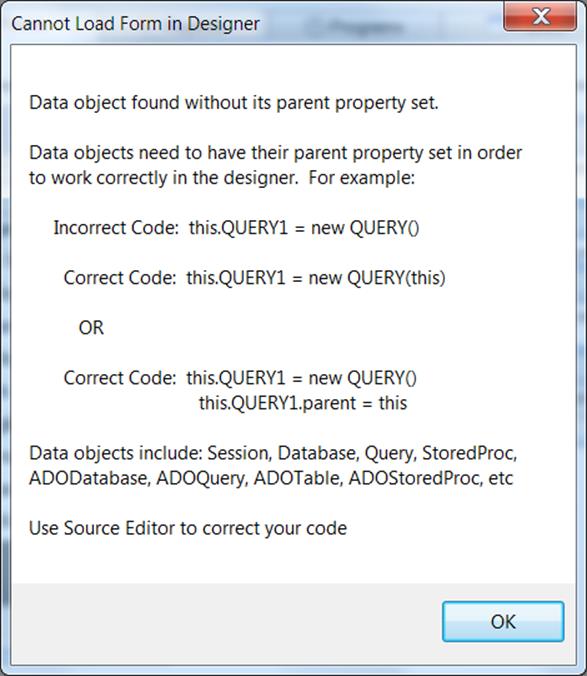
dBASE™ PLUS 10 does not support full backward compatibility.This is due to many underlying technical issues, including but not limited to:- High Precision Math implementation- A new look & feel manager- Full upgrade to the new MFC (Microsoft Foundation Class) for look and feel and underlying component structures- Updated and latest compiler support
All code from previous versions should be re-compiled.
Also, the data objects on a form have been modified to require that the parent be explicitly set in a form or a report or other CLASS.
This means that if you attempt to put a form (for example) in design mode that has data objects that are defined like this…
this.DBASESAMPLES1 = new DATABASE() with (this.DBASESAMPLES1) left = 19.0 top = 14.0 databaseName = “DBASESAMPLES” active = true endwith
this.FISH1 = new QUERY() with (this.FISH1) left = 20.0 top = 14.0 database = form.dbasesamples1 sql = “select * from FISH.DBF” active = true endwith
When you attempt to put the form in design mode you will receive info about the modification needed to make it run in dBASE™ PLUS 10…
There are a couple of ways to use Parameters with ADOQuery in 8.0.0.3.Most DBMS connections will be able to use positional parameter markers indicated by a question mark (?).Here are some examples of some connections to SQL Server using positional parmeters…
Example 1 – in Form.onOpen event.
this.COMPANIES1 = new ADOQUERY(this) with (this.COMPANIES1) left = 14.7778 top = 5.72 databaseName = “SQLTEST” sql = “SELECT * FROM KathyTest.dbo.Companies where NAME = ? ” endwith
this.GRID1 = new GRID(this) with (this.GRID1) height = 12.32 left = 3.8889 top = 2.2 width = 31.1111 endwith
this.rowset = this.companies1.rowset
function form_onOpen with (this.COMPANIES1.parameters[‘NAME’]) value = ‘dBase, LLC.’ endwith this.COMPANIES1.active = true this.grid1.dataLink = this.COMPANIES1.rowset return
Example 2 – in constructor code.
this.COMPANIES1 = new ADOQUERY(this) with (this.COMPANIES1) left = 14.7778 top = 5.72 databaseName = “SQLTEST” sql = “SELECT * FROM Test.dbo.Companies where NAME = ? ” with (params[“NAME”]) value = “dBase, LLC.” endwith active = true endwith
Example 3 – using ADOQuery.beforeConnect event.
this.COMPANIES1 = new ADOQUERY(this) with (this.COMPANIES1) beforeConnect = {;this.parameters[‘NAME’].value = ‘dBase, LLC.’} left = 17.1111 top = 10.56 databaseName = “SQLTEST” sql = “SELECT * FROM Test.dbo.Companies where NAME = ? ” cursorLocation = 1 // Server active = true endwith
You can use the named parameters in most circumstances as well.This Example also sets up a Parent/Child relationship on SQL Server data using ADOQueries and named parameters and the masterSource property.
this.ORDERS1 = new ADOQUERY(this) with (this.ORDERS1) left = 89 top = 178 databaseName = “MYSQLTEST_CA” sql = “SELECT * FROM orders” active = true endwith
this.ORDERDETAILS1 = new ADOQUERY(this) with (this.ORDERDETAILS1) left = 367 top = 195 databaseName = “MYSQLTEST_CA” sql = “SELECT * FROM orderdetails where orderNumber=:orderNumber” masterSource = form.orders1.rowset active = true endwith
[/toggle] [toggle title=”Making data in an ADOQuery object editable”]If your DBMS ADO/ODBC driver has the ability to set the cursorLocation to ‘Server’ you may be able to make your ADOQuery.rowset editable and not just readable.For example the following connects to SQL Server and will make the Companies table editable in an ADOQuery object.
this.COMPANIES1 = new ADOQUERY(this) with (this.COMPANIES1) left = 17.1111 top = 10.56 databaseName = “SQLTEST” sql = “SELECT * FROM Test.dbo.Companies” cursorLocation = 1 // Server active = true endwith
If you are unable to use cursorLocation = 1 //Server — then you can use ADOTable objects (which connect directly to table – NOT using sql) to edit your data on a form.You will know if the cursorLocation is settable or not by simply trying it. If it does not hold after setting the object active=true, then it is not available.
[/toggle] [toggle title=”Creating a Parent/Child relationship on data using masterSource”]This Example sets up a Parent/Child relationship on SQL Server data using ADOQueries and named parameters and the masterSource property.
this.ORDERS1 = new ADOQUERY(this) with (this.ORDERS1) left = 89 top = 178 databaseName = “MYSQLTEST_CA” sql = “SELECT * FROM orders” active = true endwith
this.ORDERDETAILS1 = new ADOQUERY(this) with (this.ORDERDETAILS1) left = 367 top = 195 databaseName = “MYSQLTEST_CA” sql = “SELECT * FROM orderdetails where orderNumber=:orderNumber” masterSource = form.orders1.rowset active = true endwith
[/toggle] [toggle title=”How to Execute SQL commands”]How do I execute sql commands in ADODatabase object.You would use the syntax for the particular DBMS and Driver you are connecting to.You can usually find the proper syntax by doing a Google search or looking up the driver info.
Here is an example of using the executeSQL command on an ADODatabase object with a MySQL connection using the 5.x MySQL driver.
this.ADODATABASE1 = new ADODATABASE(this) with (this.ADODATABASE1) onOpen = class::ADODATABASE1_ONOPEN onExecute = class::ADODATABASE1_ONEXECUTE left = 6.1111 top = 4.08 databaseName = “MYSQLTEST_CA” active = true endwith
function ADODATABASE1_onExecute(cmd) ?”Completed “+cmd return true
function ADODATABASE1_onOpen ?”about to : CREATE TABLE aLongVarChar (ALongText LongText);” this.executeSQL(“CREATE TABLE aLongVarChar (ALongText LongText);”) return
[/toggle] [/accordion]Language Support: Japanese Language Runtime Files are not available.
Workaround: None, we will be releasing it soon.
[/toggle] [toggle title=”Command Window Focus”]Issue #1320 – Starting with dBASE™ PLUS 8 – command window takes focus every time
Found that having the MDI Tabs displaying is the main cause of this issue.
Workaround: If you select View | MDI Tabs, and Uncheck options “Show” this issue will largely disappear.
[/toggle] [toggle title=”Rectangle Transparency Issue”]If you have a rectangle and are setting it’s transparent property to True.You may see objects looking as though they disappear inside of the Rectangle your form.
Workaround There is a simple fix. By setting the Forms doubleBuffered property to ‘True’ this should fix the rendering of the rectangle and the text or other objects inside of it.
[/toggle] [toggle title=”ADO and MySQL Non-Null Dates with Zeros”]ADO Support: Issue #391 – ADO with date field in MySQL Causing rowcount of -1.
Workaround: There is a setting in the MySQL ODBC 5.2a driver to return a SQL_NULL_DATA for a date that is all zeros…
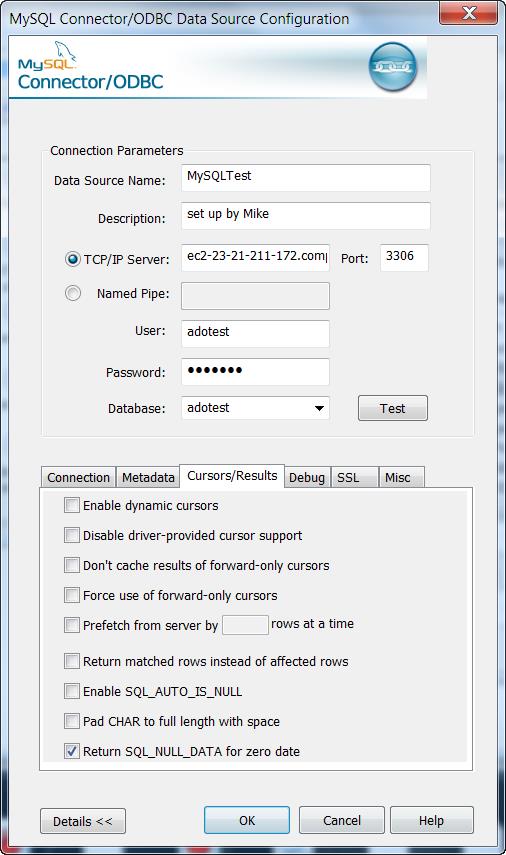
This will allow the count() to process correctly as well as view data programmaticaly. However , viewing the data in a grid or form component is not correct for the Date field that has a 0000-00-00 actual value.(NOTE: this is for dBASE™ PLUS 8 and dBASE™ PLUS 9 version 9.0.0.0)
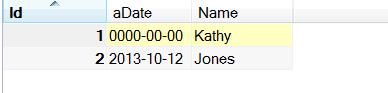
If the actual data is
Viewing the notNullDates2 table in a browser in dBASE™ (with the odbc setting above) shows this …
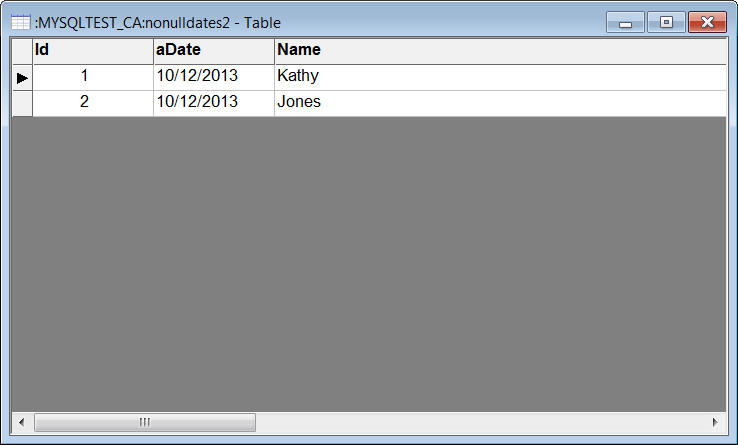
dBASE™ PLUS 9.1.0.0 has a fix for this issue …This issue is occurring due to an error being encountered when our ADOField object attempts to retrieve the value for field aDate and aDate contains a zero date. The previous value (from record 2) is being left in the field buffer.
Internally we are adding code to clear the field buffer of any old data before attempting to load it (within the internal void CADOField::RefreshBuf(void) method).This ensures that if an error occurs when retrieving the field’s current data the field will be left null instead of containing data from a different row
[/toggle] [toggle title=”ADO Apps using Apache Web Server”]ADO use with Apache: Issue #1017 – get MAV instantiating an ado object in a web app.
Workaround:This issue will occur on any 64 bit version of windows beginning with Vista.The problem is due to the fact that Windows uses the environment variable ‘CommonProgramFiles(x86)’ to find the ADO DLL’s at runtime but Apache does not allow parenthesis in the names of any environment variables that it passes or creates for web apps that it executes.It converts the parenthesis into underscores, for example: CommonProgramFiles_x86_.
The simplest solution for this is to have each web app that requires ADO access to create its own environment variable before it attempts to create any ADO objects.Adding the following code near the beginning of these web apps will create the needed environment variable.(be sure to adjust the specified path to the one matching the machine on which Apache is executing):
extern CLOGICAL SetEnvironmentVariable(CSTRING, CSTRING) kernel32 from “SetEnvironmentVariableA”bResult = SetEnvironmentVariable(“CommonProgramFiles(x86)”, “C:Program Files (x86)Common Files”)
Here is a function: initEnv(), that will only call SetEnvironmentVariable() when necessary – from within a web app. This can be added to the web class (as a method) if desired and called before any ADO objects are created:
function initEnv()local cEnvStr, cEnvVar, cEnvVarNoParens
if OSVersion() >= 6 // Windows Vista is version 6.0
if IsWow64() // test if running on 64 bit version of Windows if type(“SetEnvironmentVariable”) # “FP” extern CLOGICAL SetEnvironmentVariable(CSTRING, CSTRING) kernel32 from “SetEnvironmentVariableA” endif
cEnvVar = “CommonProgramFiles(x86)” cEnvVarNoParens = “CommonProgramFiles_x86_”
// check if correct env.var already exists and has a valuecEnvStr = getenv(cEnvVar)if empty(cEnvStr) // EnvVar with parens not found – so must create it
// check if modified env.var (without parens) already exists and has a value cEnvStr = getenv(cEnvVarNoParens)if empty(cEnvStr) // cEnvVarNoParens not found – use default value for itcEnvStr = “C:Program Files (x86)Common Files” else // otherwise cEnvVarNoParens exists and has a valueendif
// Create and set value of env.var (with parens) bResult = SetEnvironmentVariable(cEnvVar, cEnvStr)endif endifendif
return
function OSVersionlocal cVersioncVersion = OS()return val(ltrim(substr(cversion,rat(” “,cVersion))))
function IsWow64local lIsWow64
lIsWow64 = false
if type(“GetCurrentProcess”) # “FP” extern CHANDLE GetCurrentProcess( CVOID ) kernel32endif
if type(“IsWow64Process”) # “FP” extern CLOGICAL IsWow64Process(CHANDLE, CPTR CLOGICAL) kernel32endif
if type(“IsWow64Process”) = “FP” // Make sure extern worked for retrieving this function pointer// Because older versions of windows do not contain this function // From MSDN, minimum supported operating systems are: // Client OS’s: Win XP SP2, Vista // Server OS’s: Windows Server 2003 with SP1, Windows Server 2008 IsWow64Process(GetCurrentProcess(), lIsWow64)endif
return lIsWow64
In order for the above initEnv() to function correctly the following setting should be in the httpd.conf file (in any place – I put mine in the beginning) for Apache:
PassEnv CommonProgramFiles(x86)
This instructs Apache to pass the existing environment variable (CommonProgramFiles(x86) to any web apps as part of their default environment.Apache will pass this env.variable, but renamed to: CommonProgramfiles_x86_but it will have the needed path assigned to it which initEnv() will use.
Also when connecting to an ADO database it is best to use the .connectionString property when connecting to an external database in a web app.
for example …
this.adoQuery1 = new ADOQUERY(this) with (this.adoQuery1)connectionString = “” sql = “SELECT * FROM ” active = true requestLive = false endwith
[/toggle] [toggle title=”Code Completion”]Code Completion: dComplete issue – varaibles are currently not checked for scope.
Workaround: We will be implementing soon a check for the scope of a variable to get the correct list of member for the Code Complete feature. For Example…
x = new Array()
Function NewObj//test scope of new object x = new query()x. //Will show list of Array members instead of list of the query.return
Code Completion: Parent reference does not produce a member list ..in a simple form with a grid (or some other object) … in an event do .. this.parent to reference the form.
No member list is shown …
function GRID1_onOpen()this.parent.return
Code Completion: Variables defined in another file is not currently implemented for code completion
For example any objects defined in a file that is included with an #include or SET PROCEDURE to or in a Super classed file.
Code Completion: Field object not implemented for code completion
d = new database()d.databasename = “DBASESAMPLES”d.active = true
q = new query()q.database = dq.sql = “select * from Fish”q.active = true
q.asdfasdf = q.rowset.fields[“name”].
at this point there is no member list.
[/toggle] [toggle title=”Miscellaneous”]Miscellaneous: Transform without 9s in numeric mask adds extra space.
in 2.8 ?Transform(0,’@$ ‘) … returns $0
in dBASE™ PLUS 8 this returns …$ 0
unlesss (as a workaround) you add 9s as a mask…
?Transform(0,’@$ 99,999,999′) … this wil return …$0 in both dBASE™ PLUS 9 and dBASE™ PLUS 10
Miscellaneous: Adding a new event function can put the cursor in the wrong position.In a form or a report … open it in the designer .. click an event wrench in the inspector to start a new function for that event.the Source Editor will open but, the cursor may not be placed directly in the new function.
[/toggle] [/accordion]| 48 | Clients in system | |
| 32 | Sessions per client (3.5 and earlier 16 Bit, 32 Bit) | |
| 256 | Session per client (4.0 32 Bit) | |
| 32 | Open databases per session (3.5 and earlier 16 Bit, 32 Bit) | |
| 2048 | Open databases per session (4.0 32 Bit) | |
| 32 | Loaded drivers | |
| 64 | Sessions in system (3.5 and earlier 16 Bit, 32 Bit) | |
| 12288 | Sessions in system (4.0 32 Bit) | |
| 4000 | Cursors per session | |
| 16 | Entries in error stack | |
| 8 | Table types per driver | |
| 16 | Field types per driver | |
| 8 | Index types per driver | |
| 48K | Size of configuration (IDAPI.CFG) file | |
| 64K | Size of SQL statement (RequestLive=False) | |
| 4K | Size of SQL statement (RequestLive=True) | |
| 6K | Size of SQL statement (RequestLive=True) (4.01, 32 Bit) | |
| 16K | Record buffer size (SQL or ODBC) | |
| 31 | Table and field name size in characters | |
| 64 | Stored procedure name size in characters | |
| 16 | Fields in a key | |
| 3 | File extension size in characters | |
| 260 | Table name length in characters | |
| 260 | Path and file name length in characters | |
| 15 | Significant Digits |
| 127 | Tables open per system (4.0 and earlier 16 Bit32 Bit) | |
| 254 | Tables open per system (4.01 32 Bit) | |
| 64 | Record locks on one table (16Bit) per session | |
| 255 | Record locks on one table (32Bit) per session | |
| 255 | Records in transactions on a table (32 Bit) | |
| 512 | Open physical files (4.0 and earlier 16 Bit32 Bit) (DB, PX,MB, X??, Y??, VAL,TV) | |
| 1024 | Open physical files (4.01 32 Bit) (DB, PX,MB, X??, Y??, VAL,TV) | |
| 300 | Users in one PDOXUSRS.NET file | |
| 255 | Number of fields per table | |
| 255 | Size of character fields | |
| 2 | Billion records in a table | |
| 2 | Billion bytes in .DB (Table) file | |
| 10800 | Bytes per record for indexed tables | |
| 32750 | Bytes per record for non-indexed tables | |
| 127 | Number of secondary indexes per table | |
| 16 | Number of fields in an index | |
| 255 | Concurrent users per table | |
| 256 | Megabytes of data per BLOB field | |
| 100 | Passwords per session | |
| 15 | Password length | |
| 63 | Passwords per table | |
| 159 | Fields with validity checks (32 Bit) | |
| 63 | Fields with validity checks (16 Bit) | |
| 53 | Fields with Validity checks added at onetime | |
| 63 | Number of Sessions with Tables open on1 System |
| 256 | Open dBASE® tables per system (16 Bit) | |
| 350 | Open dBASE® tables per system (BDE™ 3.0 – 4.0,32 Bit) | |
| 512 | Open dBASE® tables per system (BDE™ 4.01, 32 Bit) | |
| 100 | Record locks on one dBASE® table (16 and 32 Bit) | |
| 100 | Records in transactions on a dBASE® table (32 Bit) | |
| 1 | Billion records in a table | |
| 2 | Billion bytes in .DBF (Table) file | |
| 4000 | Size in bytes per record (dBASE® 4) | |
| 32767 | Size in bytes per record (dBASE® for Windows®) | |
| 255 | Number of fields per table (dBASE® 4) | |
| 1024 | Number of fields per table (dBASE® for Windows®) | |
| 47 | Number of index tags per .MDX file | |
| 254 | Size of character fields | |
| 10 | Open master indexes (.MDX) per table | |
| 220 | Key expression length in characters |
You can create individual User Database Aliases in dBASE™ PLUS 10 when using the user’s UAC Paths in Vista or Windows 7.In the User’s PLUS.ini (or the applications .ini) file. (For example c:users[username]dBASEPLUSBinPLUS.ini)
Here is information from the dBASE™ PLUS 10 help file. Topic: ‘INI’USERBDEALIASES Is a setting which allows a standard user to create a User Alias that gets saved to the user’s ini file.A standard user will NOT be able to add a regular BDE Alias that gets stored in the BDE config file (idapi.cfg), unless the user is given administrator privileges OR is put in a custom user group that has full access to the BDE’s registry keys and the folder containing IDAPI.cfg.The alternative is to deploy your app with one of the following:- an .ini file containing User BDE Alias settings that the runtime will auto load when starting your application.- a custom routine that your program runs to create on-the-fly any User BDE Aliases needed while your program is running.To use the .ini file option, add lines similar to the following:[UserBDEAliases]0=SomeAlias1=SomeODBCAlias[SomeAlias]Driver=DBASEOptions=PATH:C:SomeAliasFolder[SomeODBCAlias]Driver=Options=
[/toggle] [toggle title=”Does dBASE™ PLUS 10 support Unicode?”]The dBASE™ IDE is able to use Unicode characters (like Chinese, Arabic etc…)
However, the .dbf and .db tables currently do not support these sets of characters. We are working on changing this for a future release. Please keep an eye on our website as we will be making many changes in the near future.
With ADO connections however, you can connect to external databases that use Unicode and other data types. Since ADO connections are outside of the BDE, it is not restricted by the limitations of the BDE.
You can find more detailed information from the help for ‘ADO’ under the ADO book in our online Help system.
https://www.dbase.com/online-help/
[/toggle] [toggle title=”INNO Setup error : Sorry can’t install this setup cancelled by user – When using Runtime/BDE “]Check for required dBASE™ Runtime files…” i get “Sorry can’t install this setup cancelled by user
Because of security issues people have found that you must use the [Run] section of inni to run the bde/runtime installer.
Try the following …
First leave the setting…UninsHS= from the [dBASERuntime] section.delete everything else under [dBASERuntime].
Instead you should use the [Run] section of inno (see the inno help under the RUN section). This is where extra .exe’s are run at the end of the app install.
After removing the [dBASERuntime] section there will be additional code that is no longer necessary so remove ..under the section starting with ‘procedure CurPageChanged(CurPageID: Integer);’ and ending with ‘end;’
Then add the following …(For an example… this is using PLUS 8.1.3.0 Runtime installers)
under …
[Files]; —————————————————–; dBASE™ Runtime Installer – put it in {tmp} dirSource: “PLUS813Runtime-b2345_EN.exe”; DestDir: “{tmp}”; Flags: ignoreversion deleteafterinstall
; —————————————————–; Manifest file for runtime:Source: “PLUSrun.exe.manifest”; DestDir: “{pf}dBASEPLUSRuntime”; Manifest file for BDE:Source: “bdeadmin.exe.manifest”; DestDir: “{cf}BorlandBDE”
Under…
[Run]; This is a Silent install of runtime suppresses the runtime install display, …; PLUSNNNNRuntime-bNNNN_en.exe -s -a Runtime= BDE= Silent -sr; In order to get this to work properly, the double-quotes are doubled up in a few places; if you look at the statement … that embeds a single double-quote (as it were) in the; parameters needed for the runtime and bde installs.Filename: {tmp}PLUS813Runtime-b2345_EN.exe; Parameters: “-s -a Runtime=””{pf}dBASEPLUSRuntime”” BDE=””{cf}BorlandBDE”” Silent -sr”; StatusMsg: “Installing dBASE™ Runtime and BDE…”; Flags: runascurrentuser; WorkingDir: {tmp};
= = = = = = = = = = = = FULL EXAMPLE OF .ISS THAT INSTALLS A SIMPLE HI.EXE AND THE RUNTIME = = = = = = = = = = = = =
[_TopOfScript]; This is a Innoscript generated by dBASE™ PLUS Project Explorer [_Project]ProjectNr=1.0.0.0ProjectName=RuntimeBDETestProjectExeFileName=C:UsersKathy KoloskyAppDataLocaldBASEPLUS8SamplesRuntimeBDETest.exeProjectMainFileName=C:UsersKathy KoloskyAppDataLocaldBASEPLUS8SamplesRuntimeTest.issProjectAuthor=Copyright © 2014 Unknown AuthorProjectCreateDate=05/21/2014 07:38:29ProjectAccessDate=05/21/2014 07:38:56ProjectdBaseVersion=dBASE™ PLUS 8.130 b2345ProjectLastdBaseRuntimeVersion=8130ProjectLastdBaseRuntimeLanguage=ENProjectdBasePRJFilename=C:UsersKathy KoloskyAppDataLocaldBASEPLUS8SamplesRuntimeTest [ISPP]#pragma option -v+#pragma verboselevel 9 ;Macro and functions successfull call acknowledgements#define Debug#define AppName “RuntimeBDETest”#define AppVersion “1.0.0.0”#define AppId “RuntimeBDETest_ID”#define AppCopyright “Copyright © 2014 Unknown Author”#define AppUninstallDir “{app}Uninstall Information” [LangOptions]LanguageCodePage=0 [Setup]SourceDir=C:UsersKathy KoloskyAppDataLocaldBASEPLUS8SamplesSetupIconFile=AppId={#AppId}AppName={#AppName}AppVersion={#AppVersion}AppVerName={#AppName} Version {#AppVersion}AppCopyright={#AppCopyright}DefaultDirName={pf}{#AppName}DefaultGroupName={#AppName}PrivilegesRequired=adminShowLanguageDialog=falseVersionInfoVersion={#AppVersion}VersionInfoDescription={#AppName} SetupVersionInfoCompany={#AppCopyright}VersionInfoTextVersion=Version {#AppVersion}UninstallFilesDir={#AppUninstallDir} [Languages]Name: en; MessagesFile: compiler:Default.isl [Messages]BeveledLabel=Copyright © 2014 Unknown Author [Files]; —————————————————–; dBASE™ Runtime Installer – put it in {tmp} dirSource: “C:RuntimeInstallerPLUS813Runtime-b2345_ALL.exe”; DestDir: “{tmp}”; Flags: ignoreversion deleteafterinstallSource: RuntimeBDETest.exe; DestDir: {app}; Flags: IgnoreVersion [INI]Filename: {app}RuntimeBDETest.ini; Section: Toolbars; Flags: UninsDeleteSectionFilename: {app}RuntimeBDETest.ini; Section: Toolbars; Key: Standard; String: 0Filename: {app}RuntimeBDETest.ini; Section: Toolbars; Key: StandardFloat; String: 0Filename: {app}RuntimeBDETest.ini; Section: Toolbars; Key: StandardStyle; String: 0Filename: {app}RuntimeBDETest.ini; Section: Desktop; Flags: UninsDeleteSectionFilename: {app}RuntimeBDETest.ini; Section: Desktop; Key: Maximized; String: 0Filename: {app}RuntimeBDETest.ini; Section: Desktop; Key: StatusBar; String: 0Filename: {app}RuntimeBDETest.ini; Section: CommandWindow; Flags: UninsDeleteSectionFilename: {app}RuntimeBDETest.ini; Section: CommandWindow; Key: Open; String: 0 [Run]; Silent install of runtime suppresses the runtime install display, and the installshield stuff …; PLUSRuntime-bNNNN_en.exe -s -a Runtime=d:dBASEPLUSRuntime BDE=d:dBASEPLUSbde Silent -sr; In order to get this to work properly, the double-quotes are doubled up in a few places; if you look at the statement … that embeds a single double-quote (as it were) in the; parameters needed for the runtime and bde installs.Filename: {tmp}PLUS813Runtime-b2345_ALL.exe; Parameters: “-s -a Runtime=””{pf}dBASEPLUSRuntime”” BDE=””{cf}BorlandBDE”” Silent -sr”; StatusMsg: “Installing dBASE™ Runtime and BDE…”; Flags: runascurrentuser; WorkingDir: {tmp}; [UninstallDelete]Type: files; Name: Filename: {app}RuntimeBDETest.ini [_EndOfScript]; © dBASE™ Portions by Jonny Kwekkeboom © 2002-2014; Visual dBase, dB2K, dBASE™ SE and dBASE™ PLUS © dataBased Intelligence.Inc Homepage: http://www.databi.com/; dQuery for Delphi,C++,dBASE™ PLUS © dataBased Intelligence.Inc see also Homepage: http://www.dQuery.com/ [Code]var FinishedInstall: Boolean;procedure InitializeWizard();begin FinishedInstall:= falseend;
procedure DeInitializeSetup( );var ErrorCode: Integer;begin if FinishedInstall then #if VER >= 0x05000100 ShellExec(‘open’,ExpandConstant(‘{group}’),”,ExpandConstant(‘{group}’), SW_SHOWNORMAL, ewNoWait, ERRORCODE); #else InstShellExec(ExpandConstant(‘{group}’), ”, ”, SW_SHOWNORMAL, ERRORCODE); #endIfend;
function InitializeSetup(): Boolean;var S: String;begin (** Create a Mutex so we can not double call this Setup.exe file **) S:='{#AppName}’; Result:= true; if CheckForMutexes(S+’_SetupMutex’)=false then Createmutex(S+’_SetupMutex’) else Result:=False;end;
[/toggle][/accordion]