
Menu
Issue #2268
Fixed – Incorrect Result with ceiling() using variable with set precision to 34 with high precision value
Issue #2805
Fixed – Toolbar floating property ReadOnly error
Issue #2806
Fixed – number class roundtype=5 (ceiling) returning wrong results
Issue #2269
Fixed – Issue with INT() – set precision to 34. Fixed – Sin() function to correctly handle sign of parameter when parameter is a high precision value
Issue #2293
Fixed – ‘Data type mismatch’ error: expecting Numeric’ with set prec to 34 using for…next loop
Form and Form objects
Issue #2761
Fixed – onLeftDblclick not working properly on grid
Issue #2812
Fixed – crash using spinbox with z function
Issue #2813
Fixed – shape hiding container in dBASE Plus 12 (starting with b2584)
Issue #2771
Fixed – spontaneous exit: notebook objects
IDE
Issue #2505
Fixed – With autocomplete on … dBASE freezes (hangs) when trying to reference an array item after typing ‘[‘
Issue #2556
Fixed – About Dialog – Credits List – displaying with left edge cut off
New Toolbar Property
New property
isFloating returns true if toolbar is floating false if it is not
Issue #2776
Fixed – A SDI form with a container holding a notebook component returns an incorrect object reference for a notebook.onRightMouseDown event
Issue #2785
Fixed – Treeview onRightMouseDown did not close open menus
Toolbar / Title bar
Issue #2767
Fixed – Starting with dBASE Plus 8 – toolbar cannot be made undetachable
Issue #2763
Fixed – SDI form window title bar menu open fires form menu ROOT_onInitMenu() twice
ADO
Issue #2075
Fixed – invalid subscript reference – ADOquery object can not re-define sql and parameters
Project Explorer
Issue N/A
Fixed – When trying to run the Project Explorer or DMD Designer you will get an error ‘Property is read only : floating’.
Issue #2764
Fixed – SDI form open MenuBar menus are not closed when the next mouse action is on a container or container object
Issue #2763
Fixed – Form menu’s OnInitMenu() event is firing when user clicks on system menu button in form’s title bar.
Issue #2774
Fixed – SDI form open menu detaches from form on form move
cannot recreate the issue in b2583
Issue #2765
Fixed – Directly after toggle. was able to see the correct checked property. could not recreate issue in b2583
Issue #2775
Fixed – Main menu stays open when clicking on other form objects. cannot recreate in b2583
Issue #2750
Fixed – Accelerator Key in Menu issue – Starting in b2534 – Plus 11 – doesn’t work
Issue #2776
Fixed – SDI MenuBar incorrect ROOT_onInitMenu() method executes INSTEAD of the MenuBar ROOT_onInitMenu() method
FORM OBJECTS
Issue #2465
Fixed – ‘enter’ issue with cuaenter off (regression from fix for issue #2418) – b2544
Issue #2502
Fixed – using the Alt+key combination fires the on_click event three times
FUNCTIONS
Issue #2757
Fixed – FOUND() returns True after a failed SEEK when previous SEEK was successful
Issue #1448
Fixed – regression to #1422 – using transform with Z option leaves in decimal characters
OTHER
Issue #2083
Fixed – #include preprocessor directive needs to look in ‘documents’ folder as well as the ‘appdata’ folder for #5 search option. If not found in current directory and no path was specified using path or source alias and _app.useUACPaths is true: search for file in “
Issue #2512
Fixed dComplete option list displaying while typing a numeric array index
Issue #2518
Fixed handling of negative zero values when comparing them with other values. Modified “=” and “==” operators for double and high precision values so they ignore the sign of a value when the value is zero.
NEW
Project Explorer now includes the ability to set up INNO Installer upper right icon and left side image.
PLUS IDE
Issue #2652
Fixed – with View set to ‘small icons’ selecting a file is tricky in some cases. It appears that the choose area is not quite right in the navigator.
Issue #2649
Fixed – Debugger call stack window loses columns
Issue #2732
Fixed – Navigator window is scrolled back to the top after file edit
FORM and FORM OBJECTS
Issue #1472
Fixed – menu.statusMessage does not show up in the status bar
Issue #2740
Fixed – a non-MDI form open menu does NOT close when a form popUp menu opens or the form menu loses focus
Issue #2742
Fixed – popup menu designer left in memory after designing
Issue #2731
Fixed – popup onInitMenu – fire’s in form onOpen and multiple times when doing rightClick
Issue #2747
Fixed – grid column editor control editortype does not include ‘6 – pushbutton’ for languages other than english
OTHER
Issue #2744
Fixed – JSON – Cannot retrieve JSON Array Elements that are objects
// Test json array containing an object as element
jstr = ‘[{“A”:”a”, “B”:”b”, “C”:”c”}]’
o = new json(jstr)
if not o.hasparseerror()
if o.isarray()
? “o is an array”
? ” o.size()==”,o.size()
if o.size() > 0
m = o.getat(1)
if m.isobject() //fixed in b2579
? “m is an object!”
else
? “m is NOT an object!”
endif
endif
endif
endif
Issue #1472
Fixed – menu.statusMessage does not show up in the status bar
Issue #2075
Fixed – invalid subscript reference – ADOquery object can not re-define sql and parameters
Issue #2083
Fixed – #include preprocessor directive needs to look in ‘documents’ folder as well as the ‘appdata’ folder for #5 search option. If not found in current directory and no path was specified using path or source alias and _app.useUACPaths is true: search for file in “
Issue #2268
Fixed – Incorrect Result with ceiling() using variable with set precision to 34 with high precision value
Issue #2269
Fixed – Issue with INT() – set precision to 34. Fixed – Sin() function to correctly handle sign of parameter when parameter is a high precision value
Issue #2293
Fixed – ‘Data type mismatch’ error: expecting Numeric’ with set prec to 34 using for…next loop
Issue #2457
Fixed – Form Designer rulers displaying when turned off after creating an event handler for Editor object
Issue #2465
Fixed – ‘enter’ issue with cuaenter off (regression from fix for issue #2418) – b2544
Issue #2502
Fixed – using the Alt+key combination fires the on_click event three times
Issue #2505
Fixed – With autocomplete on … dBASE freezes (hangs) when trying to reference an array item after typing ‘[‘
Issue #2512
Fixed – dComplete option list displaying while typing a numeric array index
Issue #2518
Fixed – handling of negative zero values when comparing them with other values. Modified “=” and “==” operators for double and high precision values so they ignore the sign of a value when the value is zero.
Issue #2556
Fixed – About Dialog – Credits List – displaying with left edge cut off
Issue #2649
Fixed – Debugger call stack window loses columns
Issue #2652
Fixed – with View set to ‘small icons’ selecting a file is tricky in some cases. It appears that the choose area is not quite right in the navigator.
Issue #2731
Fixed – popup onInitMenu – fire’s in form onOpen and multiple times when doing rightClick
Issue #2732
Fixed – Navigator window is scrolled back to the top after file edit
Issue #2740
Fixed – a non-MDI form open menu does NOT close when a form popUp menu opens or the form menu loses focus
Issue #2742
Fixed – popup menu designer left in memory after designing
Issue #2744
Fixed – JSON – Cannot retrieve JSON Array Elements that are objects
// Test json array containing an object as element
jstr = ‘[{“A”:”a”, “B”:”b”, “C”:”c”}]’
o = new json(jstr)
if not o.hasparseerror()
if o.isarray()
? “o is an array”
? ” o.size()==”,o.size()
if o.size() > 0
m = o.getat(1)
if m.isobject() //fixed in b2579
? “m is an object!”
else
? “m is NOT an object!”
endif
endif
endif
endif
Issue #2747
Fixed – grid column editor control editortype does not include ‘6 – pushbutton’ for languages other than english
Issue #2750
Fixed – Accelerator Key in Menu issue – Starting in b2534 – Plus 11 – doesn’t work
Issue #2757
Fixed – FOUND() returns True after a failed SEEK when previous SEEK was successful
Issue #2761
Fixed – onLeftDblclick not working properly on grid
Issue #2763
Fixed – Form menu’s OnInitMenu() event is firing when user clicks on system menu button in form’s title bar.
Issue #2763
Fixed – SDI form window title bar menu open fires form menu ROOT_onInitMenu() twice
Issue #2764
Fixed – SDI form open MenuBar menus are not closed when the next mouse action is on a container or container object
Issue #2765
Fixed – Directly after toggle. was able to see the correct checked property. could not recreate issue in b2583
Issue #2767
Fixed – Starting with dBASE Plus 8 – toolbar cannot be made undetachable
Issue #2771
Fixed – spontaneous exit: notebook objects
Issue #2774
Fixed – SDI form open menu detaches from form on form move
cannot recreate the issue in b2583
Issue #2775
Fixed – Main menu stays open when clicking on other form objects. cannot recreate in b2583
Issue #2776
Fixed – A SDI form with a container holding a notebook component returns an incorrect object reference for a notebook.onRightMouseDown event
Issue #2776
Fixed – SDI MenuBar incorrect ROOT_onInitMenu() method executes INSTEAD of the MenuBar ROOT_onInitMenu() method
Issue #2785
Fixed – Treeview onRightMouseDown did not close open menus
Issue #2802
Fixed – ceiling() returns 0 .. when 1 is expected when using a high precision value
Issue #2805
Fixed – Toolbar floating property ReadOnly error
Issue #2806
Fixed – number class roundtype=5 (ceiling) returning wrong results
Issue #2812
Fixed – crash using spinbox with z function
Issue #2813
Fixed – shape hiding container in dBASE Plus 12 (starting with b2584)
Issue -N/A-
Fixed – When trying to run the Project Explorer or DMD Designer you will get an error ‘Property is read only : floating’.
defaultHeadingType – to specify which heading
type is used by default. Possible values are
0 – Use Standard Column Heading
1 – Use Pushbutton Column Heading
The default value is 0 – Use Standard Column Heading
headingHeight – Contains the height of the grid’s column headers in the form’s current metric. The default for headingHeight is 1 Char or 22 pixels
headingType – new GRIDCOLUMN property to set the heading type for this column.
0 – Grid Default
1 – Standard Column Heading
2 – Pushbutton Column Heading
Also, The GRIDCOLUMN class has a new editorType property setting of 6=Pushbutton.
This new GRIDCOLUMNEDITOR object has it’s own properties derived from the pushbutton class.
[/toggle]
[toggle title=”GRID PUSHBUTTON PROPERTIES”]
marginLeft – margin between left edge of cell and left edge of button in pixels.
marginTop – margin between top edge of cell and top edge of button in pixels.
marginRight – margin between right edge of cell and right edge of button in pixels.
marginBottom – margin between bottom edge of cell and bottom edge of button in pixels.
[/toggle] [/accordion]If you get this message..
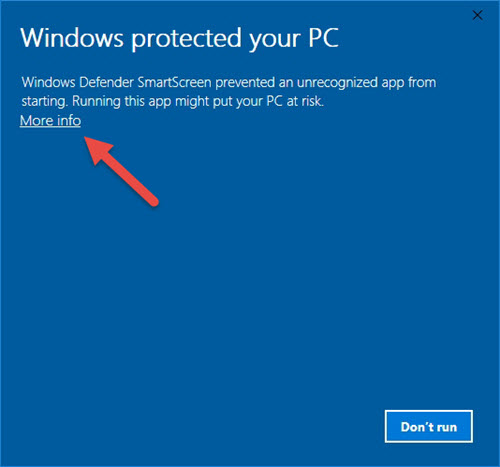
Click where it says ‘More Info’ (red arrow) … this is a link to open the option to run the installer.
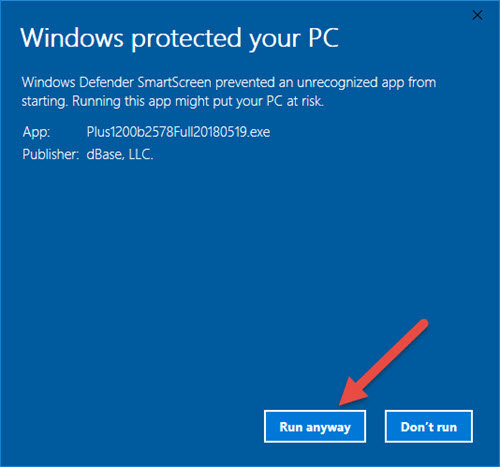
Click ‘Run anyway’ (red arrow) to continue.
[/toggle] [/accordion]It is never easy to drop support for a OS, especially one as popular as XP. However the resources needed to retrofit, recompile, retrofit, etc. makes it unfeasible to continue support more so when you know that if you hit a snag with the older compiler for instance, you can’t go to Microsoft for a fix.
So that puts us in an untenable position for a platform that is being rapidly phased out by organizations and individuals every day. That is why we made the difficult decision to drop support for Windows XP and Windows Server 2003 (server version of XP).
dBASE™ PLUS 12 does not support full backward compatibility.
This is due to many underlying technical issues, including but not limited to:
– High Precision Math implementation
– A new look & feel manager
– Full upgrade to the new MFC (Microsoft Foundation Class) for look and feel and underlying component structures
– Updated and latest compiler support
All code from previous versions should be re-compiled.
If the idapi.cfg was in c:\program files\ ….common files\borland\bde
Which would be the case with 2.6x…
You should still have the idapi.cfg in c:\program files\ ….common files\borland\bde after installing dBASE™ PLUS 12.
The installer will create a new idapi.cfg in c:\programdata\common files\borland\bde but you should still have the one in c:\Program files\common files\borland\bde
And should be able to copy that over to c:\programdata\common files\borland\bde and use it.
Also, the data objects on a form have been modified to require that the parent be explicitly set in a form or a report or other CLASS.
This means that if you attempt to put a form (for example) in design mode that has data objects that are defined like this…
this.DBASESAMPLES1 = new DATABASE()
with (this.DBASESAMPLES1)
left = 19.0
top = 14.0
databaseName = “DBASESAMPLES”
active = true
endwith
this.FISH1 = new QUERY()
with (this.FISH1)
left = 20.0
top = 14.0
database = form.dbasesamples1
sql = “select * from FISH.DBF”
active = true
endwith
When you attempt to put the form in design mode you will receive info about the modification needed to make it run in dBASE™ PLUS 12…
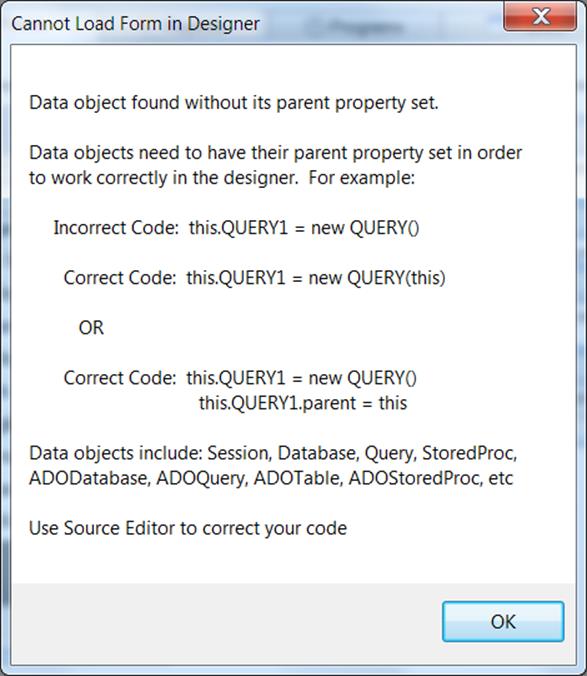
dBASE™ PLUS 12 does not support full backward compatibility.
This is due to many underlying technical issues, including but not limited to:
– High Precision Math implementation
– A new look & feel manager
– Full upgrade to the new MFC (Microsoft Foundation Class) for look and feel and underlying component structures
– Updated and latest compiler support
All code from previous versions should be re-compiled.
Also, the data objects on a form have been modified to require that the parent be explicitly set in a form or a report or other CLASS.
This means that if you attempt to put a form (for example) in design mode that has data objects that are defined like this…
this.DBASESAMPLES1 = new DATABASE()
with (this.DBASESAMPLES1)
left = 19.0
top = 14.0
databaseName = “DBASESAMPLES”
active = true
endwith
this.FISH1 = new QUERY()
with (this.FISH1)
left = 20.0
top = 14.0
database = form.dbasesamples1
sql = “select * from FISH.DBF”
active = true
endwith
When you attempt to put the form in design mode you will receive info about the modification needed to make it run in dBASE™ PLUS 12…
There are a couple of ways to use Parameters with ADOQuery in 8.0.0.3.
Most DBMS connections will be able to use positional parameter markers indicated by a question mark (?).
Here are some examples of some connections to SQL Server using positional parmeters…
Example 1 – in Form.onOpen event.
this.COMPANIES1 = new ADOQUERY(this)
with (this.COMPANIES1)
left = 14.7778
top = 5.72
databaseName = “SQLTEST”
sql = “SELECT * FROM KathyTest.dbo.Companies where NAME = ? “
endwith
this.GRID1 = new GRID(this)
with (this.GRID1)
height = 12.32
left = 3.8889
top = 2.2
width = 31.1111
endwith
this.rowset = this.companies1.rowset
function form_onOpen
with (this.COMPANIES1.parameters[‘NAME’])
value = ‘dBase, LLC.’
endwith
this.COMPANIES1.active = true
this.grid1.dataLink = this.COMPANIES1.rowset
return
Example 2 – in constructor code.
this.COMPANIES1 = new ADOQUERY(this)
with (this.COMPANIES1)
left = 14.7778
top = 5.72
databaseName = “SQLTEST”
sql = “SELECT * FROM Test.dbo.Companies where NAME = ? “
with (params[“NAME”])
value = “dBase, LLC.”
endwith
active = true
endwith
Example 3 – using ADOQuery.beforeConnect event.
this.COMPANIES1 = new ADOQUERY(this)
with (this.COMPANIES1)
beforeConnect = {;this.parameters[‘NAME’].value = ‘dBase, LLC.’}
left = 17.1111
top = 10.56
databaseName = “SQLTEST”
sql = “SELECT * FROM Test.dbo.Companies where NAME = ? “
cursorLocation = 1 // Server
active = true
endwith
You can use the named parameters in most circumstances as well.
This Example also sets up a Parent/Child relationship on SQL Server data using ADOQueries and named parameters and the masterSource property.
this.ORDERS1 = new ADOQUERY(this)
with (this.ORDERS1)
left = 89
top = 178
databaseName = “MYSQLTEST_CA”
sql = “SELECT * FROM orders”
active = true
endwith
this.ORDERDETAILS1 = new ADOQUERY(this)
with (this.ORDERDETAILS1)
left = 367
top = 195
databaseName = “MYSQLTEST_CA”
sql = “SELECT * FROM orderdetails where orderNumber=:orderNumber”
masterSource = form.orders1.rowset
active = true
endwith
If your DBMS ADO/ODBC driver has the ability to set the cursorLocation to ‘Server’ you may be able to make your ADOQuery.rowset editable and not just readable.
For example the following connects to SQL Server and will make the Companies table editable in an ADOQuery object.
this.COMPANIES1 = new ADOQUERY(this)
with (this.COMPANIES1)
left = 17.1111
top = 10.56
databaseName = “SQLTEST”
sql = “SELECT * FROM Test.dbo.Companies”
cursorLocation = 1 // Server
active = true
endwith
If you are unable to use cursorLocation = 1 //Server — then you can use ADOTable objects (which connect directly to table – NOT using sql) to edit your data on a form.
You will know if the cursorLocation is settable or not by simply trying it. If it does not hold after setting the object active=true, then it is not available.
This Example sets up a Parent/Child relationship on SQL Server data using ADOQueries and named parameters and the masterSource property.
this.ORDERS1 = new ADOQUERY(this)
with (this.ORDERS1)
left = 89
top = 178
databaseName = “MYSQLTEST_CA”
sql = “SELECT * FROM orders”
active = true
endwith
this.ORDERDETAILS1 = new ADOQUERY(this)
with (this.ORDERDETAILS1)
left = 367
top = 195
databaseName = “MYSQLTEST_CA”
sql = “SELECT * FROM orderdetails where orderNumber=:orderNumber”
masterSource = form.orders1.rowset
active = true
endwith
How do I execute sql commands in ADODatabase object.
You would use the syntax for the particular DBMS and Driver you are connecting to.
You can usually find the proper syntax by doing a Google search or looking up the driver info.
Here is an example of using the executeSQL command on an ADODatabase object with a MySQL connection using the 5.x MySQL driver.
this.ADODATABASE1 = new ADODATABASE(this)
with (this.ADODATABASE1)
onOpen = class::ADODATABASE1_ONOPEN
onExecute = class::ADODATABASE1_ONEXECUTE
left = 6.1111
top = 4.08
databaseName = “MYSQLTEST_CA”
active = true
endwith
function ADODATABASE1_onExecute(cmd)
?”Completed “+cmd
return true
function ADODATABASE1_onOpen
?”about to : CREATE TABLE aLongVarChar (ALongText LongText);”
this.executeSQL(“CREATE TABLE aLongVarChar (ALongText LongText);”)
return
Language Support: Japanese Language Runtime Files are not available.
Workaround: None, we will be releasing it soon.
[/toggle] [toggle title=”Command Window Focus”]Issue #1320 – Starting with dBASE™ PLUS 8 – command window takes focus every time
Found that having the MDI Tabs displaying is the main cause of this issue.
Workaround: If you select View | MDI Tabs, and Uncheck options “Show” this issue will largely disappear.
[/toggle] [toggle title=”Rectangle Transparency Issue”]If you have a rectangle and are setting it’s transparent property to True.
You may see objects looking as though they disappear inside of the Rectangle your form.
Workaround There is a simple fix. By setting the Forms doubleBuffered property to ‘True’ this should fix the rendering of the rectangle and the text or other objects inside of it.
[/toggle] [toggle title=”ADO and MySQL Non-Null Dates with Zeros”]ADO Support: Issue #391 – ADO with date field in MySQL Causing rowcount of -1.
Workaround: There is a setting in the MySQL ODBC 5.2a driver to return a SQL_NULL_DATA for a date that is all zeros…
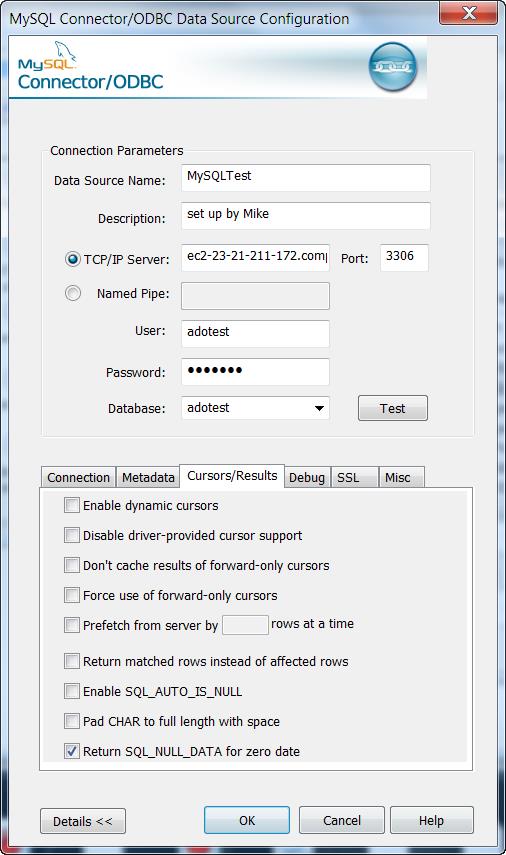
This will allow the count() to process correctly as well as view data programmaticaly. However , viewing the data in a grid or form component is not correct for the Date field that has a 0000-00-00 actual value.
(NOTE: this is for dBASE™ PLUS 8 and dBASE™ PLUS 9 version 9.0.0.0)
If the actual data is
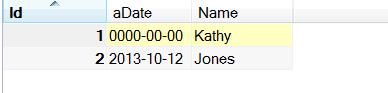
Viewing the notNullDates2 table in a browser in dBASE™ (with the odbc setting above) shows this …
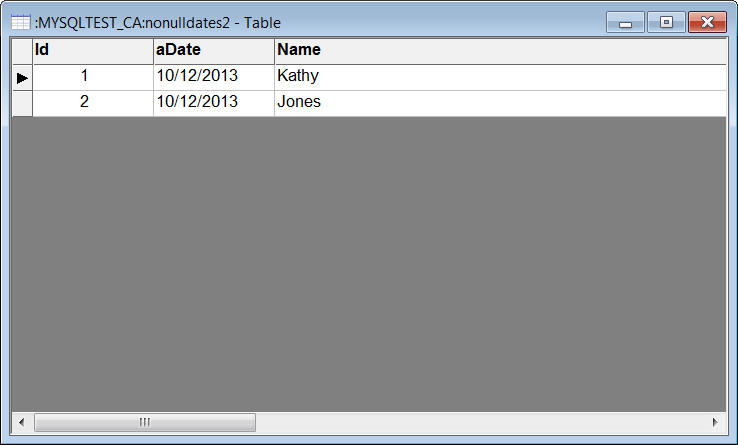
dBASE™ PLUS 9.1.0.0 has a fix for this issue …
This issue is occurring due to an error being encountered when our ADOField object attempts to retrieve the value for field aDate and aDate contains a zero date. The previous value (from record 2) is being left in the field buffer.
ADO use with Apache: Issue #1017 – get MAV instantiating an ado object in a web app.
Workaround:
This issue will occur on any 64 bit version of windows beginning with Vista.
The problem is due to the fact that Windows uses the environment variable ‘CommonProgramFiles(x86)’ to find the ADO DLL’s at runtime but Apache does not allow parenthesis in the names of any environment variables that it passes or creates for web apps that it executes.
It converts the parenthesis into underscores, for example: CommonProgramFiles_x86_.
The simplest solution for this is to have each web app that requires ADO access to create its own environment variable before it attempts to create any ADO objects.
Adding the following code near the beginning of these web apps will create the needed environment variable.
(be sure to adjust the specified path to the one matching the machine on which Apache is executing):
extern CLOGICAL SetEnvironmentVariable(CSTRING, CSTRING) kernel32 from “SetEnvironmentVariableA”
bResult = SetEnvironmentVariable(“CommonProgramFiles(x86)”, “C:\Program Files (x86)\Common Files”)
Here is a function: initEnv(), that will only call SetEnvironmentVariable() when necessary – from within a web app. This can be added to the web class (as a method) if desired and called before any ADO objects are created:
function initEnv()
local cEnvStr, cEnvVar, cEnvVarNoParens
if OSVersion() >= 6 // Windows Vista is version 6.0
if IsWow64() // test if running on 64 bit version of Windows
if type(“SetEnvironmentVariable”) # “FP”
extern CLOGICAL SetEnvironmentVariable(CSTRING, CSTRING) kernel32 from “SetEnvironmentVariableA”
endif
cEnvVar = “CommonProgramFiles(x86)”
cEnvVarNoParens = “CommonProgramFiles_x86_”
// check if correct env.var already exists and has a value
cEnvStr = getenv(cEnvVar)
if empty(cEnvStr)
// EnvVar with parens not found – so must create it
// check if modified env.var (without parens) already exists and has a value
cEnvStr = getenv(cEnvVarNoParens)
if empty(cEnvStr)
// cEnvVarNoParens not found – use default value for it
cEnvStr = “C:\Program Files (x86)\Common Files”
else
// otherwise cEnvVarNoParens exists and has a value
endif
// Create and set value of env.var (with parens)
bResult = SetEnvironmentVariable(cEnvVar, cEnvStr)
endif
endif
endif
return
function OSVersion
local cVersion
cVersion = OS()
return val(ltrim(substr(cversion,rat(” “,cVersion))))
function IsWow64
local lIsWow64
lIsWow64 = false
if type(“GetCurrentProcess”) # “FP”
extern CHANDLE GetCurrentProcess( CVOID ) kernel32
endif
if type(“IsWow64Process”) # “FP”
extern CLOGICAL IsWow64Process(CHANDLE, CPTR CLOGICAL) kernel32
endif
if type(“IsWow64Process”) = “FP”
// Make sure extern worked for retrieving this function pointer
// Because older versions of windows do not contain this function
// From MSDN, minimum supported operating systems are:
// Client OS’s: Win XP SP2, Vista
// Server OS’s: Windows Server 2003 with SP1, Windows Server 2008
IsWow64Process(GetCurrentProcess(), lIsWow64)
endif
return lIsWow64
In order for the above initEnv() to function correctly the following setting should be in the httpd.conf file (in any place – I put mine in the beginning) for Apache:
PassEnv CommonProgramFiles(x86)
This instructs Apache to pass the existing environment variable (CommonProgramFiles(x86) to any web apps as part of their default environment.
Apache will pass this env.variable, but renamed to: CommonProgramfiles_x86_
but it will have the needed path assigned to it which initEnv() will use.
Also when connecting to an ADO database it is best to use the .connectionString property when connecting to an external database in a web app.
for example …
this.adoQuery1 = new ADOQUERY(this)
with (this.adoQuery1)
connectionString = “
sql = “SELECT * FROM
active = true
requestLive = false
endwith
Code Completion: dComplete issue – varaibles are currently not checked for scope.
Workaround: We will be implementing soon a check for the scope of a variable to get the correct list of member for the Code Complete feature. For Example…
x = new Array()
Function NewObj
//test scope of new object
x = new query()
x. //Will show list of Array members instead of list of the query.
return
Code Completion: Parent reference does not produce a member list ..
in a simple form with a grid (or some other object) … in an event do .. this.parent to reference the form.
No member list is shown …
function GRID1_onOpen()
this.parent.
return
Code Completion: Variables defined in another file is not currently implemented for code completion
For example any objects defined in a file that is included with an #include or SET PROCEDURE to or in a Super classed file.
Code Completion: Field object not implemented for code completion
d = new database()
d.databasename = “DBASESAMPLES”
d.active = true
q = new query()
q.database = d
q.sql = “select * from Fish”
q.active = true
q.asdfasdf = q.rowset.fields[“name”].
at this point there is no member list.
[/toggle] [toggle title=”Miscellaneous”]Miscellaneous: Transform without 9s in numeric mask adds extra space.
in 2.8 ?Transform(0,’@$ ‘) … returns
$0
in dBASE™ PLUS 8 this returns …
$ 0
unlesss (as a workaround) you add 9s as a mask…
?Transform(0,’@$ 99,999,999′) … this wil return …
$0 in both dBASE™ PLUS 9 thru dBASE™ PLUS 12
Miscellaneous: Adding a new event function can put the cursor in the wrong position.
In a form or a report … open it in the designer .. click an event wrench in the inspector to start a new function for that event.
the Source Editor will open but, the cursor may not be placed directly in the new function.
| 48 | Clients in system | |
| 32 | Sessions per client (3.5 and earlier 16 Bit, 32 Bit) | |
| 256 | Session per client (4.0 32 Bit) | |
| 32 | Open databases per session (3.5 and earlier 16 Bit, 32 Bit) | |
| 2048 | Open databases per session (4.0 32 Bit) | |
| 32 | Loaded drivers | |
| 64 | Sessions in system (3.5 and earlier 16 Bit, 32 Bit) | |
| 12288 | Sessions in system (4.0 32 Bit) | |
| 4000 | Cursors per session | |
| 16 | Entries in error stack | |
| 8 | Table types per driver | |
| 16 | Field types per driver | |
| 8 | Index types per driver | |
| 48K | Size of configuration (IDAPI.CFG) file | |
| 64K | Size of SQL statement (RequestLive=False) | |
| 4K | Size of SQL statement (RequestLive=True) | |
| 6K | Size of SQL statement (RequestLive=True) (4.01, 32 Bit) | |
| 16K | Record buffer size (SQL or ODBC) | |
| 31 | Table and field name size in characters | |
| 64 | Stored procedure name size in characters | |
| 16 | Fields in a key | |
| 3 | File extension size in characters | |
| 260 | Table name length in characters | |
| 260 | Path and file name length in characters | |
| 15 | Significant Digits |
| 127 | Tables open per system (4.0 and earlier 16 Bit32 Bit) | |
| 254 | Tables open per system (4.01 32 Bit) | |
| 64 | Record locks on one table (16Bit) per session | |
| 255 | Record locks on one table (32Bit) per session | |
| 255 | Records in transactions on a table (32 Bit) | |
| 512 | Open physical files (4.0 and earlier 16 Bit32 Bit) (DB, PX,MB, X??, Y??, VAL,TV) | |
| 1024 | Open physical files (4.01 32 Bit) (DB, PX,MB, X??, Y??, VAL,TV) | |
| 300 | Users in one PDOXUSRS.NET file | |
| 255 | Number of fields per table | |
| 255 | Size of character fields | |
| 2 | Billion records in a table | |
| 2 | Billion bytes in .DB (Table) file | |
| 10800 | Bytes per record for indexed tables | |
| 32750 | Bytes per record for non-indexed tables | |
| 127 | Number of secondary indexes per table | |
| 16 | Number of fields in an index | |
| 255 | Concurrent users per table | |
| 256 | Megabytes of data per BLOB field | |
| 100 | Passwords per session | |
| 15 | Password length | |
| 63 | Passwords per table | |
| 159 | Fields with validity checks (32 Bit) | |
| 63 | Fields with validity checks (16 Bit) | |
| 53 | Fields with Validity checks added at onetime | |
| 63 | Number of Sessions with Tables open on1 System |
| 256 | Open dBASE® tables per system (16 Bit) | |
| 350 | Open dBASE® tables per system (BDE™ 3.0 – 4.0,32 Bit) | |
| 512 | Open dBASE® tables per system (BDE™ 4.01, 32 Bit) | |
| 100 | Record locks on one dBASE® table (16 and 32 Bit) | |
| 100 | Records in transactions on a dBASE® table (32 Bit) | |
| 1 | Billion records in a table | |
| 2 | Billion bytes in .DBF (Table) file | |
| 4000 | Size in bytes per record (dBASE® 4) | |
| 32767 | Size in bytes per record (dBASE® for Windows®) | |
| 255 | Number of fields per table (dBASE® 4) | |
| 1024 | Number of fields per table (dBASE® for Windows®) | |
| 47 | Number of index tags per .MDX file | |
| 254 | Size of character fields | |
| 10 | Open master indexes (.MDX) per table | |
| 220 | Key expression length in characters |
Here is information from the dBASE™ PLUS 12 help file. Topic: ‘INI’
USERBDEALIASES Is a setting which allows a standard user to create a User Alias that gets saved to the user’s ini file.
A standard user will NOT be able to add a regular BDE Alias that gets stored in the BDE config file (idapi.cfg), unless the user is given administrator privileges OR is put in a custom user group that has full access to the BDE’s registry keys and the folder containing IDAPI.cfg.
The alternative is to deploy your app with one of the following:
– an .ini file containing User BDE Alias settings that the runtime will auto load when starting your application.
– a custom routine that your program runs to create on-the-fly any User BDE Aliases needed while your program is running.
To use the .ini file option, add lines similar to the following:
[UserBDEAliases]
0=SomeAlias
1=SomeODBCAlias
[SomeAlias]
Driver=DBASE
Options=PATH:C:SomeAliasFolder
[SomeODBCAlias]
Driver=
Options=
[/toggle]
[toggle title=”Does dBASE™ PLUS 12 support Unicode?”]
The dBASE™ IDE is able to use Unicode characters (like Chinese, Arabic etc…)
However, the .dbf and .db tables currently do not support these sets of characters. We are working on changing this for a future release. Please keep an eye on our website as we will be making many changes in the near future.
With ADO connections however, you can connect to external databases that use Unicode and other data types. Since ADO connections are outside of the BDE, it is not restricted by the limitations of the BDE.
You can find more detailed information from the help for ‘ADO’ under the ADO book in our online Help system.
https://www.dbase.com/online-help/
[/toggle] [/accordion]