
Menu
Issue #1417
Fixed – Hitting enter on a pushbutton in a child form is not working
Issue #1425
Fixed – When the form is in design mode. As you click around on the lines in the form designer… the other components seem to disappear.
Issue #1436
Fixed – Extra blank option in menu in Window menu
Issue #1437
Fixed – onDesignOpen event not working for a report
Issue #1438
Fixed – Lose Command Window command pane in dBASE 9 but, not in dBASE 8
Issue #1440
Fixed – Try to open dBASE twice get Database Engine Error: Directory is Busy
Issue #0290
Fixed – Problem with nested functions – Value out of Range and Function expected errors
Issue #0835
Fixed – too many nested DO/UDF errors – using FLOOR function
Issue #0846
Fixed – default visible property for toolbar was showing as true though it was actually false.
Issue #0968
Fixed – get ‘Improper argument encountered’ error during close of form with upper left title bar close option
Issue #1081
Fixed – lose Text search after using it – After doing a text search – unable to do a second text search
Issue #1370
Fixed – multiple params in INSERT INTO statement does not work
Issue #1375
Fixed – issue with floor method … cannot get right result when multiplying
n = new number(3)
n.roundType = 6 //Floor
n.round() // now returns correct result
Issue #1378
Fixed – VAL() of negative number in string type returns 0
Issue #1382
Fixed – Additional situations where ‘encountered improper argument’ error occurs.
Issue #1384
Fixed – Setting _app.session.temppath leads to crash when shutting down dBASE
Issue #1391
Fixed – Doublebuffer container button outline issue
Issue #1393
Fixed – Custom Window menu not firing custom CloseAll onClick event
Issue #1394
Fixed – Source Tree flickers on large files
Issue #1395
Fixed – Menu issue – Application Menu Deactivates
Issue #1396
Fixed – MOD is not working with calculations as a parameter
Issue #1401
Fixed – Checkbox graphics artifact
Issue #1402
Fixed – cannot open a project with an ampersand in the directory name
Issue #1403
Fixed – Losing source code for a function after adding a new menu item
Issue #1406
Fixed – get mav trying to change a .sql command when using a datalinked grid (even when unlinking the grid before changing the query)
Issue #1407
Fixed – ADOQuery assuming a parameter variable when : or ? is in a set of quotes
Issue #1409
Fixed – Customize Tool Window pages for non-English resource files do not match current English version
Issue #1421
Fixed – Datamodule is displaying twice in the form designer
Issue #1422
Fixed – The TRANSFORM() function no longer returns the correct # of blanks for 0 and a Z function.
Issue #1424
Fixed – class does not exist error on report canRender for text object
Issue #1427
Fixed – Field palette in French needs to be adjusted.
Issue #0320
Added – option to re-arrange Component and Field Palette items alphabetically
Issue #1399
Upgraded – Upgraded Menu Designer’s “Insert Window Menu” option
Issue #378
Fixed – calling second form with readmodal() does not then give the first form focus when closed
Issue #1168
Fixed – Some report events are not saving in the linker code
Issue #1312
Fixed – Get MAV adding data objects to a blank report (without any streamsource or pagetemplate)
Issue #1327
Fixed – Project Explorer’s toolbar is opening to the right of where the system toolbar was before it was turned off
Issue #1328
Fixed – When in the SQL Builder click the F12 – the Save icon on the toolbar gets disabled.
Issue #1329
Fixed – Resource images showing black background.
Issue #1332
Fixed – Z function (replacing zero with space) does not work in db8 or 9 but, does in 2.8
Issue #1337
Fixed – Quit in Command window not writing to .ini files
Issue #1340
Fixed – Report Designer losing changes after opening Source Editor and making additional change then closing Source Editor
Issue #1342
Fixed – Context Menu options not Enabling/Disabling for Editor Component
Issue #1346
Fixed – get ‘unknown database’ error trying to create a .sql using a User BDE Alias
Issue #1347
Fixed – get ‘database not initialized’ using a BDE Alias/ODBC connection to another database
Issue #1349
Fixed – report image does not display correctly in 9.3 when alignment is set to 3
Issue #1354
Fixed – App Crashes in dBASE Plus 9 … but not in dBASE Plus 8
Issue #1350
Fixed – after making a change in the source editor the treeview reverts to the top instead of staying in the current method
Issue #1353
Fixed – set epoch doesn’t work for dates when no setting is available in the .ini file
Issue #1355
Fixed – setting database and query properties manually then turning them on does not populate the Field Palette
Issue #1356
Fixed – Print Table Structure not working
Issue #1357
Fixed – Database Engine not Initialized error this time using BDE Alias with DATABASE NOT already open
Issue #1359
Fixed – color dialog does not show the current color in use
Issue #1360
Fixed – Form Wizard Graphics not showing correctly
Issue #1361
Fixed – Both Print and Print Preview do not work for ADO Table Designer
Issue #1365
Fixed – menu items flicker very badly in dBASE 9
Issue #1371
Fixed – Double firing of onLostFocus for a form
Issue #1372
Fixed – Listbox Key event doesn’t allow a form.close()
Issue #1373
Fixed – Another ActiveX bug in dBASE 9 that did not occur in dBASE 8
Issue #311
Fixed – Default for Encrypted table file changed to User’s directory – otherwise, get encryption not support errors
Issue #359
Fixed – Relax the Save Changes dialog in the form designer
Issue #445
Fixed – issue with combobox display
Issue #575
Fixed – numbers in a table with 19 or 20 digits using all digits available show as asterisks
Issue #1021
dBASE Plus has encountered an internal operating system error – when closing app that is using a datamodule
Issue #1211
Fixed – PaintBox Transparency issue
Issue #1237
Fixed – Resource dialog paint issues
Issue #1265
Fixed – SET FUNCTION does not work in command window.
Issue #1266
Fixed – regression on toolbar image background transparency
Issue #1269
Fixed – try running app (using SQL through ADO only – no BDE) in runtime with DefaultEngine=None .. causes crash if BDE is not installed
Issue #1270
Fixed – when clicking on item in the treeview pane in source editor … make code in right pane show more
Issue #1271
Fixed – Ctrl+F4 and File Close is bringing up the print dialog rather than closing the Source Editor
Issue #1272
Fixed – Resource images issues
Issue #1274
Fixed – slow forms issue (Forms without oleAutoClient should be opening faster)
Issue #1275
Fixed – Moving transparent component in transparent container in Form Designer also moves background with component
Issue #1276
Fixed – Record and Playback keystrokes is broken
Issue #1281
Fixed – TextLabel with transparent = true … changing text shows bleed through of old test
Issue #1283
Fixed – container transparency issues
Issue #1285
Fixed – Strange behavior with spinbox assuming a value
Issue #1294
Fixed – Adding image file to pushbutton does not stream filename
Issue #1295
Fixed – Problem with dBasePLUS 9 and OleAutoClient( “Microsoft.XMLDOM” )
Issue #1296
Fixed – exe built with 9.2 throws Error reading file: error when .ico is not in same dir as the form.
Issue #1297
Fixed – Toolbutton does not show .gif images.
Issue #1298
Fixed – toolbar button image cannot use source alias in dBASE PLUS 8 or 9 . But, was able to in dBASE Plus 2.8
Issue #1300
Fixed – ‘Escape’ AKA – ‘Cancel’ does not work
Issue #1315
Fixed – .prg and .cc is not automatically re-compiled after making a change
Issue #1324
Fixed – get blank Source Editor after clicking ‘fix’ when running a form, report. .prg or datamodule with error ‘unrecognized command verb’
Issue #1325
Fixed – get MAV issuing crea repo new.rep
Issue #834
Fixed – bitXor with double MOD function with a variable returns incorrect value
Issue #855
Fixed – ListBox transparent does not work on a container
Issue #984
Fixed – No Tab is created for non-visual custom objects in Component Palette
Issue #1153
Fixed – this. inside event handler for an object defined in another file brings up entire form’s members
Issue #1159
Fixed – Failed login credentials when using SQL builder with ODBC/BDE connection to SQL Server
Issue #1188
Fixed – custom components not showing up in component palette using SET PROCEDURE TO …
Issue #1211
Fixed – PaintBox Transparency issue
Issue #1220
Fixed – Re-executing previous command line in Command Window is not copying executed line to current line in Command Window
Issue #1225
Fixed – MAV on SQL Builder
Issue #1227
Fixed – Login Dialog is failing in Navigator – MS-SQL OLE DB connection that requires login (password not included in connection details)
Issue #1228
Fixed – SQL Builder Connection fails using OLEDB provider for ms-sql without password
Issue #1230
Fixed – rectangle border is not being removed when set correctly in a report
Issue #1231
Fixed – menu option to ‘close’ print preview form … produces crash
Issue #1233
Fixed – Recent Files list is not being saved to plus.ini when exiting dBASE IDE
Issue #1235
Fixed – cursor movements do not adhere to endOfLine behavior
Issue #1236
Fixed – On Report, rectangle with borderstyle = 5 (Double) causes border to overlap text
Issue #1237
Fixed – resource dialog is not painting correctly
Issue #1240
Fixed – Update graphics library to support Server OS’s and fix other graphic issues with toolbars
Issue #1264
Fixed – Support full transparency when component’s transparent property is set to True
Issue #1070
Fixed issue where Gifs were not drawing in image objects on a form.
Changes not related to bugs…
– Updated Graphics for file type icons, (Forms, Datamodules etc…)
– Line numbers in margins are set to a smaller font
– Added support for //*/ in code folding
ADO related isues
Issue #391
Found Fix – ADO with date field in MySQL Causing rowcount of -1
Issue #789
Fixed – When assigning a value to a ADO character field .. if the number of characters is > the size of the field .. nothing gets entered
Issue #892
Fixed – Multiple params does not work for updates to tables
Issue #893
Fixed – adoParameter does not understand timestamp
Issue #1216
Fixed – MySQL Non-Null dates with 0000-00-00 … will not show as null but, as the last date in the buffer
MENU related issues
Issue #212
Fixed – Custom .bmp (no graphic) not Displaying in Menu
Issue #818
Fixed – images disappear from menu items after closing standard toolbar
Issue #1027
Fixed – Menu item not greyed out when it should be. In 2.80 when a program changed a menu from enabled to disabled it grayed outthere and then. In Plus8 it does not grey out until you wave the mouse over it.
Issue #1115
Fixed – reference to a form from a menu opening forms based on custom forms is referencing the wrong form
Issue #1170
Fixed – Plus executable is not responding when closing form with menu item and popup menu.
Issue #1178
Fixed – Crash in app with menu and onOpen form event
ActiveX/OLEAutoClient
Issue #1176
Fixed – get OLE Bad Variable Type when trying to do a setting in Excel
Issue #1077
Fixed – get OLE Bad Variable Type when trying to do a document.write in a Microsoft Web Browser
Code streaming / Designer / IDE issues
Issue #1131
Fixed – cursor is getting misplaced after adding new method to a datamodule or a form or report
Issue #1155
Fixed – In source editor, colorizing of function names within commands is wrong
Issue #1157
Fixed – in dBASE Plus 9 – added calculated field is producing invalid subscript error when putting form in design mode
Issue #1158
Fixed – newly added functions need to have a space above during streaming
Issue #1160
Fixed – modi comm
Issue #1162
Fixed – Close tree view from context menu.In Form use right-click context menu item to close the treeview is back in and works.
Issue #1164
Fixed – custom form class definition is different in dBASE Plus 9. Class declaration with custom form now uses the custom form as the super class form name instead of a generic ‘FORM’
Issue #1166
Fixed – datamodule object represented twice in the editor’s tree view.
Issue #1068
Fixed – Dragging or moving a form over the Command Window Input Pane prevents part of the form from painting
Issue #1172
Fixed – Multiple user BDE Aliases
Issue #1173
Fixed – Code streamer is adding multiple code blocks – WITH … ENDIWITH is duplicated after the form’s rowset declaration
Issue #1182
Fixed – get Improper argument adding a menu item to an existing menu
Issue #1185
Fixed – some functions missing in treeview in source editor
Issue #1189
Fixed – Print Preview for the table viewer (containing grid) is overwriting columns when there are more columns than will fit on page
Issue #1191
Fixed – source alias parser is confused by a period in a path
Issue #1197
Fixed – Shift-Tab doesn’t decrease indent. It changes the selected object in the Inspector instead.
Issue #1199
Fixed – Old version of code hints displaying for: IF, ELSE, ENDIF, CASE, etc…The single line version of the code hints for: IF, ELSE, ENDIF, CASE, WITH, etc being displayed
Issue #1205
Fixed – Cursor shows up on wrong line number in the Source Editor during a ‘Fix’ operation
Issue #1206
Fixed – Loss of Print Preview data and paging
Issue #1209
Fixed – Autocomplete listing of functions and Procedures should have parenthesis – ()
Issue #1210
Fixed – Treeview graphics
Issue #1213
Fixed – cannot ‘insert from file’.
Issue #1214
Fixed – Cannot print from source editor
Autocomplete
Issue #1207
Implement previously defined variables for autocompletion.
Issue #1208
Implement list of user defined properties for objects defined in outside class (in the same file)
Issue #1201
Implement listing of User Defined Functions, Procedures and custom class names in autocomplete list in Source Editor (for items in the current file only – does not include items in an external file added with SET PROCEDURE or #INCLUDE).
MAV and Crashes
Issue #1161
Fixed – MAV after trying to open a form with ReadModal – app uses custom forms and more
Issue #1163
Fixed – ‘Field name error’ Try to either create a new table or edit a table. Add a new field … get error.
Issue #1194
Fixed – Get Crash with Seek()
PE
Issue #1171
Fixed – Project Explorer Help (still pointing to dbase8.hlp)
Form and Form object errors
Issue #841
Fixed – ListBox linked to dBASE fields – all but character and Autoinc. shows blackout on selected row.
Issue #1204
Fixed – get Value out of Range trying to set TabBox CurSel
Issue #1211
Fixed – PaintBox Transparency issue
BDE Table issues
Issue #1169
Fixed – Get ‘end of table’ error modifying table with deleted records.
Issue #1186
Fixed – dBASE crashes with Enable BCD set to true for dBASE Alias
Issue #1194
Fixed – Strange behavior with Seek()
Issue #1215
Fixed – Bugs with numeric fields over 10 digits – Get Syntax error or Data Type Mismatch error with Seek()
Issue #0024
fixed “TBAR variable not defined” error when closing PE without the standard toolbar.
Issue #0212
Fixed – Custom .bmp (no graphic) not Displaying in Menu
Issue #0290
Fixed – Problem with nested functions – Value out of Range and Function expected errors
Issue #0311
Fixed – Default for Encrypted table file changed to User’s directory – otherwise, get encryption not support errors
Issue #0320
Added – option to re-arrange Component and Field Palette items alphabetically
Issue #0359
Fixed – Relax the Save Changes dialog in the form designer
Issue #0378
Fixed – calling second form with readmodal() does not then give the first form focus when closed
Issue #0391
Found Fix – ADO with date field in MySQL Causing rowcount of -1
Issue #0445
Fixed – issue with combobox display
Issue #0575
Fixed – numbers in a table with 19 or 20 digits using all digits available show as asterisks
Issue #0720
Fixed MAV using form.close() method in menu
Issue #0726
Fixed ability to round() values that do not have sufficiently accurate binary representations by adding a SET HIGHPRECISION setting.
Issue #0751
Fixed ‘bad command’ using tiled option in oleAutoClient excel command
Issue #0789
Fixed – When assigning a value to a ADO character field .. if the number of characters is > the size of the field .. nothing gets entered
Issue #0791
Fixed – Container paint issues with transparency and jpg as background.
Issue #0818
Fixed – images disappear from menu items after closing standard toolbar
Issue #0832
Fixed – text objects are not quite transparent in an exe – before 9.0 build?
Issue #0833
Fixed – Gif file not printing on Reports.
Issue #0834
Fixed – bitXor with double MOD function with a variable returns incorrect value
Issue #0835
Fixed – too many nested DO/UDF errors – using FLOOR function
Issue #0836
Fixed – Applications using MV_MENU.co trigger error “OLE Bad Variable Type”
Issue #0841
Fixed – ListBox linked to dBASE fields – all but character and Autoinc. shows blackout on selected row.
Issue #0846
Fixed – default visible property for toolbar was showing as true though it was actually false.
Issue #0851
Component Palette: implement named custom tabs when adding custom objects to component palette
Issue #0855
Fixed ListBox Transparent so it works when ListBox is within a Container
Issue #0857
Fixed form and component’s helpFile property so dBASE does not automatically modify the path. Instead, it leaves it as entered
Issue #0860
dBASE generated app can now use Themes
Issue #0892
Fixed – Multiple params does not work for updates to tables
Issue #0893
Fixed – adoParameter does not understand timestamp
Issue #0948
Fixed having to force calculation of variable before calculation can be done on ado database
Issue #0961
Fixed Text Items in ListBox print with bottom of each row cutoff
Issue #0963
Fixed ‘Invalid Key’ error with ActiveX ListView object
Issue #0968
Fixed – get ‘Improper argument encountered’ error during close of form with upper left title bar close option
Issue #0969
Fixed more instances of pure virtual function call error or Memory Access violations
Issue #0984
Fixed – No Tab is created for non-visual custom objects in Component Palette
Issue #0985
Added Shortcut Key Ctrl+Q to Table Menu for the Abandon option
Issue #0997
Fixed reference to dBASE INc. found in an error dialog
Issue #1002
Fixed problems with null logical fields comparisons in a table (=Null is now returning true when it should)
Issue #1013
Fixed dbase table’s field readonly property which was not streamed out to source code after setting it in the inspector
Issue #1018
Fixed wrong ascii code for Delete key in an editor
Issue #1021
dBASE Plus has encountered an internal operating system error – when closing app that is using a datamodule
Issue #1021
Fixed ‘dBASE Plus has encountered an internal operating system error’ – when closing app that is using a datamodule
Issue #1027
Fixed – Menu item not greyed out when it should be. In 2.80 when a program changed a menu from enabled to disabled it grayed out there and then. In Plus8 it does not grey out until you wave the mouse over it.
Issue #1029
Corrected streaming order of requestLive and Active in ADOQuery class
Issue #1067
Added Forground and Background indicators in Source Editor Properties Color tab
Issue #1068
Fixed – Dragging or moving a form over the Command Window Input Pane prevents part of the form from painting
Issue #1070
Fixed issue where Gifs were not drawing in image objects on a form.
Issue #1070
Fixed issue where Gifs were not drawing in image objects on a form.
Issue #1077
Fixed – get OLE Bad Variable Type when trying to do a document.write in a Microsoft Web Browser
Issue #1081
Fixed – lose Text search after using it – After doing a text search – unable to do a second text search
Issue #1115
Fixed – reference to a form from a menu opening forms based on custom forms is referencing the wrong form
Issue #1131
Fixed – cursor is getting misplaced after adding new method to a datamodule or a form or report
Issue #1153
Fixed – this. inside event handler for an object defined in another file brings up entire form’s members
Issue #1155
Fixed – In source editor, colorizing of function names within commands is wrong
Issue #1157
Fixed – in dBASE Plus 9 – added calculated field is producing invalid subscript error when putting form in design mode
Issue #1158
Fixed – newly added functions need to have a space above during streaming
Issue #1159
Fixed – Failed login credentials when using SQL builder with ODBC/BDE connection to SQL Server
Issue #1160
Fixed – modi comm
Issue #1161
Fixed – MAV after trying to open a form with ReadModal – app uses custom forms and more
Issue #1162
Fixed – Close tree view from context menu.In Form use right-click context menu item to close the treeview is back in and works.
Issue #1163
Fixed – ‘Field name error’ Try to either create a new table or edit a table. Add a new field … get error.
Issue #1164
Fixed – custom form class definition is different in dBASE Plus 9. Class declaration with custom form now uses the custom form as the super class form name instead of a generic ‘FORM’
Issue #1166
Fixed – datamodule object represented twice in the editor’s tree view.
Issue #1168
Fixed – Some report events are not saving in the linker code
Issue #1169
Fixed – Get ‘end of table’ error modifying table with deleted records.
Issue #1170
Fixed – Plus executable is not responding when closing form with menu item and popup menu.
Issue #1171
Fixed – Project Explorer Help (still pointing to dbase8.hlp)
Issue #1172
Fixed – Multiple user BDE Aliases
Issue #1173
Fixed – Code streamer is adding multiple code blocks – WITH … ENDIWITH is duplicated after the form’s rowset declaration
Issue #1176
Fixed – get OLE Bad Variable Type when trying to do a setting in Excel
Issue #1178
Fixed – Crash in app with menu and onOpen form event
Issue #1182
Fixed – get Improper argument adding a menu item to an existing menu
Issue #1185
Fixed – some functions missing in treeview in source editor
Issue #1186
Fixed – dBASE crashes with Enable BCD set to true for dBASE Alias
Issue #1188
Fixed – custom components not showing up in component palette using SET PROCEDURE TO …
Issue #1189
Fixed – Print Preview for the table viewer (containing grid) is overwriting columns when there are more columns than will fit on page
Issue #1191
Fixed – source alias parser is confused by a period in a path
Issue #1194
Fixed – Get Crash with Seek()
Issue #1194
Fixed – Strange behavior with Seek()
Issue #1197
Fixed – Shift-Tab doesn’t decrease indent. It changes the selected object in the Inspector instead.
Issue #1199
Fixed – Old version of code hints displaying for: IF, ELSE, ENDIF, CASE, etc…The single line version of the code hints for: IF, ELSE, ENDIF, CASE, WITH, etc being displayed
Issue #1201
Implement listing of User Defined Functions, Procedures and custom class names in autocomplete list in Source Editor (for items in the current file only – does not include items in an external file added with SET PROCEDURE or #INCLUDE).
Issue #1204
Fixed – get Value out of Range trying to set TabBox CurSel
Issue #1205
Fixed – Cursor shows up on wrong line number in the Source Editor during a ‘Fix’ operation
Issue #1206
Fixed – Loss of Print Preview data and paging
Issue #1207
Implement previously defined variables for autocompletion.
Issue #1208
Implement list of user defined properties for objects defined in outside class (in the same file)
Issue #1209
Fixed – Autocomplete listing of functions and Procedures should have parenthesis – ()
Issue #1210
Fixed – Treeview graphics
Issue #1211
Fixed – PaintBox Transparency issue
Issue #1211
Fixed – PaintBox Transparency issue
Issue #1211
Fixed – PaintBox Transparency issue
Issue #1213
Fixed – cannot ‘insert from file’.
Issue #1214
Fixed – Cannot print from source editor
Issue #1215
Fixed – Bugs with numeric fields over 10 digits – Get Syntax error or Data Type Mismatch error with Seek()
Issue #1216
Fixed – MySQL Non-Null dates with 0000-00-00 … will not show as null but, as the last date in the buffer
Issue #1220
Fixed – Re-executing previous command line in Command Window is not copying executed line to current line in Command Window
Issue #1225
Fixed – MAV on SQL Builder
Issue #1227
Fixed – Login Dialog is failing in Navigator – MS-SQL OLE DB connection that requires login (password not included in connection details)
Issue #1228
Fixed – SQL Builder Connection fails using OLEDB provider for ms-sql without password
Issue #1230
Fixed – rectangle border is not being removed when set correctly in a report
Issue #1231
Fixed – menu option to ‘close’ print preview form … produces crash
Issue #1233
Fixed – Recent Files list is not being saved to plus.ini when exiting dBASE IDE
Issue #1235
Fixed – cursor movements do not adhere to endOfLine behavior
Issue #1236
Fixed – On Report, rectangle with borderstyle = 5 (Double) causes border to overlap text
Issue #1237
Fixed – resource dialog is not painting correctly
Issue #1237
Fixed – Resource dialog paint issues
Issue #1240
Fixed – Update graphics library to support Server OS’s and fix other graphic issues with toolbars
Issue #1264
Fixed – Support full transparency when component’s transparent property is set to True
Issue #1265
Fixed – SET FUNCTION does not work in command window.
Issue #1266
Fixed – regression on toolbar image background transparency
Issue #1269
Fixed – try running app (using SQL through ADO only – no BDE) in runtime with DefaultEngine=None .. causes crash if BDE is not installed
Issue #1270
Fixed – when clicking on item in the treeview pane in source editor … make code in right pane show more
Issue #1271
Fixed – Ctrl+F4 and File Close is bringing up the print dialog rather than closing the Source Editor
Issue #1272
Fixed – Resource images issues
Issue #1274
Fixed – slow forms issue (Forms without oleAutoClient should be opening faster)
Issue #1275
Fixed – Moving transparent component in transparent container in Form Designer also moves background with component
Issue #1276
Fixed – Record and Playback keystrokes is broken
Issue #1281
Fixed – TextLabel with transparent = true … changing text shows bleed through of old test
Issue #1283
Fixed – container transparency issues
Issue #1285
Fixed – Strange behavior with spinbox assuming a value
Issue #1294
Fixed – Adding image file to pushbutton does not stream filename
Issue #1295
Fixed – Problem with dBasePLUS 9 and OleAutoClient( “Microsoft.XMLDOM” )
Issue #1296
Fixed – exe built with 9.2 throws Error reading file: error when .ico is not in same dir as the form.
Issue #1297
Fixed – Toolbutton does not show .gif images.
Issue #1298
Fixed – toolbar button image cannot use source alias in dBASE PLUS 8 or 9 . But, was able to in dBASE Plus 2.8
Issue #1300
Fixed – ‘Escape’ AKA – ‘Cancel’ does not work
Issue #1312
Fixed – Get MAV adding data objects to a blank report (without any streamsource or pagetemplate)
Issue #1315
Fixed – .prg and .cc is not automatically re-compiled after making a change
Issue #1324
Fixed – get blank Source Editor after clicking ‘fix’ when running a form, report. .prg or datamodule with error ‘unrecognized command verb’
Issue #1325
Fixed – get MAV issuing crea repo new.rep
Issue #1327
Fixed – Project Explorer’s toolbar is opening to the right of where the system toolbar was before it was turned off
Issue #1328
Fixed – When in the SQL Builder click the F12 – the Save icon on the toolbar gets disabled.
Issue #1329
Fixed – Resource images showing black background.
Issue #1332
Fixed – Z function (replacing zero with space) does not work in db8 or 9 but, does in 2.8
Issue #1337
Fixed – Quit in Command window not writing to .ini files
Issue #1340
Fixed – Report Designer losing changes after opening Source Editor and making additional change then closing Source Editor
Issue #1342
Fixed – Context Menu options not Enabling/Disabling for Editor Component
Issue #1346
Fixed – get ‘unknown database’ error trying to create a .sql using a User BDE Alias
Issue #1347
Fixed – get ‘database not initialized’ using a BDE Alias/ODBC connection to another database
Issue #1349
Fixed – report image does not display correctly in 9.3 when alignment is set to 3
Issue #1350
Fixed – after making a change in the source editor the treeview reverts to the top instead of staying in the current method
Issue #1353
Fixed – set epoch doesn’t work for for dates when no setting is available in the .ini file
Issue #1354
Fixed – App Crashes in dBASE Plus 9 … but not in dBASE Plus 8
Issue #1355
Fixed – setting database and query properties manually then turning them on does not populate the Field Palette
Issue #1356
Fixed – Print Table Structure not working
Issue #1357
Fixed – Database Engine not Initialized error this time using BDE Alias with DATABASE NOT already open
Issue #1359
Fixed – color dialog does not show the current color in use
Issue #1360
Fixed – Form Wizard Graphics not showing correctly
Issue #1361
Fixed – Both Print and Print Preview do not work for ADO Table Designer
Issue #1365
Fixed – menu items flicker very badly in dBASE 9
Issue #1370
Fixed – multiple params in INSERT INTO statement does not work
Issue #1371
Fixed – Double firing of onLostFocus for a form
Issue #1372
Fixed – Listbox Key event doesn’t allow a form.close()
Issue #1373
Fixed – Another ActiveX bug in dBASE 9 that did not occur in dBASE 8
Issue #1375
Fixed – issue with floor method … cannot get right result when multiplying
n = new number(3)
n.roundType = 6 //Floor
n.round() // now returns orrect result
Issue #1378
Fixed – VAL() of negative number in string type returns 0
Issue #1382
Fixed – Additional situations where ‘encountered improper argument’ error occurs.
Issue #1384
Fixed – Setting _app.session.temppath leads to crash when shutting down dBASE
Issue #1391
Fixed – Doublebuffer container button outline issue
Issue #1393
Fixed – Custom Window menu not firing custom CloseAll onClick event
Issue #1394
Fixed – Source Tree flickers on large files
Issue #1395
Fixed – Menu issue – Application Menu Deactivates
Issue #1396
Fixed – MOD is not working with calculations as a parameter
Issue #1399
Upgraded – Upgraded Menu Designer’s “Insert Window Menu” option
Issue #1401
Fixed – Checkbox graphics artifact
Issue #1402
Fixed – cannot open a project with an ampersand in the directory name
Issue #1403
Fixed – Losing source code for a function after adding a new menu item
Issue #1406
Fixed – get mav trying to change a .sql command when using a datalinked grid (even when unlinking the grid before changing the query)
Issue #1407
Fixed – ADOQuery assuming a parameter variable when : or ? is in a set of quotes
Issue #1409
Fixed – Customize Tool Window pages for non-English resource files do not match current English version
Issue #1417
Fixed – Hitting enter on a pushbutton in a child form is not working
Issue #1421
Fixed – Datamodule is displaying twice in the form designer
Issue #1422
Fixed – The TRANSFORM() function no longer returns the correct # of blanks for 0 and a Z function.
Issue #1424
Fixed – class does not exist error on report canRender for text object
Issue #1425
Fixed – When the form is in design mode. As you click around on the lines in the form designer… the other components seem to disappear.
Issue #1427
Fixed – Field palette in French needs to be adjusted.
Issue #1436
Fixed – Extra blank option in menu in Window menu
Issue #1437
Fixed – onDesignOpen event not working for a report
Issue #1438
Fixed – Lose Command Window command pane in dBASE 9 but, not in dBASE 8
Issue #1440
Fixed – Try to open dBASE twice get Database Engine Error: Directory is Busy
NO, dBASE PLUS 9 is not designed to work on XP. Since Microsoft dropped support for the OS back in April we have followed suit. While there are still many users of XP, we are seeing a dramatic drop in the number of people using it.
It is never easy to drop support for a OS, especially one as popular as XP. However the resources needed to retrofit, recompile, retrofit, etc. makes it unfeasible to continue support more so when you know that if you hit a snag with the older compiler for instance, you can’t go to Microsoft for a fix.
So that puts us in an untenable position for a platform that is being rapidly phased out by organizations and individuals every day. That is why we made the difficult decision to drop support for Windows XP and Windows Server 2003 (server version of XP).
[/toggle] [toggle title=”Are dBASE PLUS 8.X projects forwardly compatible with dBASE PLUS 9?”]YES, projects developed in dBASE PLUS FULL 8.X should compile with little to no changes.
[/toggle] [toggle title=”Upgrading from dBASE PLUS 2.6x and lower to dBASE PLUS 9″]dBASE PLUS 9 does not support full backward compatibility.
This is due to many underlying technical issues, including but not limited to:
– High Precision Math implementation
– A new look & feel manager
– Full upgrade to the new MFC (Microsoft Foundation Class) for look and feel and underlying component structures
– Updated and latest compiler support
All code from previous versions should be re-compiled.
If the idapi.cfg was in c:\program files ….\common files\borland\bde
Which would be the case with 2.6x…
You should still have the idapi.cfg in c:\program files ….\common files\borland\bde after installing dBASE PLUS 9.
The installer will create a new idapi.cfg in c:\programdata\common files\borland\bde but you should still have the one in c:\Program files\common files\borland\bde
And should be able to copy that over to c:\programdata\common files\borland\bde and use it.
Also, the data objects on a form have been modified to require that the parent be explicitly set in a form or a report or other CLASS.
This means that if you attempt to put a form (for example) in design mode that has data objects that are defined like this…
this.DBASESAMPLES1 = new DATABASE()
with (this.DBASESAMPLES1)
left = 19.0
top = 14.0
databaseName = “DBASESAMPLES”
active = true
endwith
this.FISH1 = new QUERY()
with (this.FISH1)
left = 20.0
top = 14.0
database = form.dbasesamples1
sql = “select * from FISH.DBF”
active = true
endwith
When you attempt to put the form in design mode you will receive info about the modification needed to make it run in dBASE Plus 9…
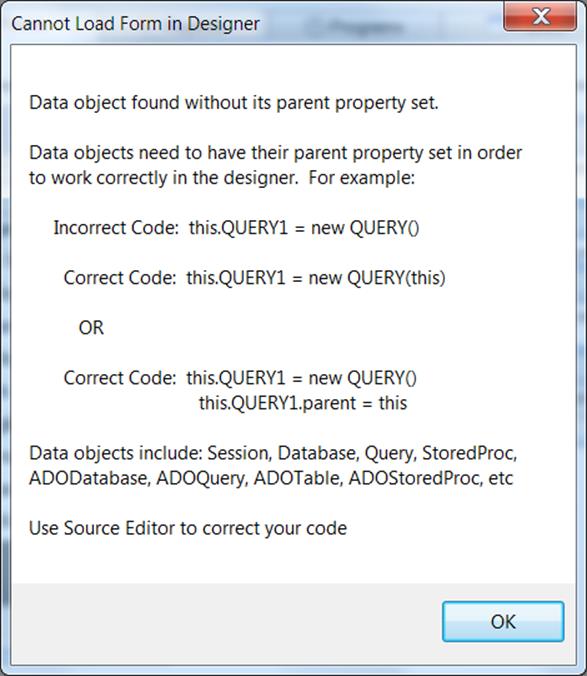
dBASE PLUS 9 does not support full backward compatibility.
This is due to many underlying technical issues, including but not limited to:
– High Precision Math implementation
– A new look & feel manager
– Full upgrade to the new MFC (Microsoft Foundation Class) for look and feel and underlying component structures
– Updated and latest compiler support
All code from previous versions should be re-compiled.
Also, the data objects on a form have been modified to require that the parent be explicitly set in a form or a report or other CLASS.
This means that if you attempt to put a form (for example) in design mode that has data objects that are defined like this…
this.DBASESAMPLES1 = new DATABASE()
with (this.DBASESAMPLES1)
left = 19.0
top = 14.0
databaseName = “DBASESAMPLES”
active = true
endwith
this.FISH1 = new QUERY()
with (this.FISH1)
left = 20.0
top = 14.0
database = form.dbasesamples1
sql = “select * from FISH.DBF”
active = true
endwith
When you attempt to put the form in design mode you will receive info about the modification needed to make it run in dBASE Plus 9…
There are a couple of ways to use Parameters with ADOQuery in 8.0.0.3.
Most DBMS connections will be able to use positional parameter markers indicated by a question mark (?).
Here are some examples of some connections to SQL Server using positional parmeters…
Example 1 – in Form.onOpen event.
this.COMPANIES1 = new ADOQUERY(this)
with (this.COMPANIES1)
left = 14.7778
top = 5.72
databaseName = “SQLTEST”
sql = “SELECT * FROM KathyTest.dbo.Companies where NAME = ? “
endwith
this.GRID1 = new GRID(this)
with (this.GRID1)
height = 12.32
left = 3.8889
top = 2.2
width = 31.1111
endwith
this.rowset = this.companies1.rowset
function form_onOpen
with (this.COMPANIES1.parameters[‘NAME’])
value = ‘dBase, LLC.’
endwith
this.COMPANIES1.active = true
this.grid1.dataLink = this.COMPANIES1.rowset
return
Example 2 – in constructor code.
this.COMPANIES1 = new ADOQUERY(this)
with (this.COMPANIES1)
left = 14.7778
top = 5.72
databaseName = “SQLTEST”
sql = “SELECT * FROM Test.dbo.Companies where NAME = ? “
with (params[“NAME”])
value = “dBase, LLC.”
endwith
active = true
endwith
Example 3 – using ADOQuery.beforeConnect event.
this.COMPANIES1 = new ADOQUERY(this)
with (this.COMPANIES1)
beforeConnect = {;this.parameters[‘NAME’].value = ‘dBase, LLC.’}
left = 17.1111
top = 10.56
databaseName = “SQLTEST”
sql = “SELECT * FROM Test.dbo.Companies where NAME = ? “
cursorLocation = 1 // Server
active = true
endwith
You can use the named parameters in most circumstances as well.
This Example also sets up a Parent/Child relationship on SQL Server data using ADOQueries and named parameters and the masterSource property.
this.ORDERS1 = new ADOQUERY(this)
with (this.ORDERS1)
left = 89
top = 178
databaseName = “MYSQLTEST_CA”
sql = “SELECT * FROM orders”
active = true
endwith
this.ORDERDETAILS1 = new ADOQUERY(this)
with (this.ORDERDETAILS1)
left = 367
top = 195
databaseName = “MYSQLTEST_CA”
sql = “SELECT * FROM orderdetails where orderNumber=:orderNumber”
masterSource = form.orders1.rowset
active = true
endwith
If your DBMS ADO/ODBC driver has the ability to set the cursorLocation to ‘Server’ you may be able to make your ADOQuery.rowset editable and not just readable.
For example the following connects to SQL Server and will make the Companies table editable in an ADOQuery object.
this.COMPANIES1 = new ADOQUERY(this)
with (this.COMPANIES1)
left = 17.1111
top = 10.56
databaseName = “SQLTEST”
sql = “SELECT * FROM Test.dbo.Companies”
cursorLocation = 1 // Server
active = true
endwith
If you are unable to use cursorLocation = 1 //Server — then you can use ADOTable objects (which connect directly to table – NOT using sql) to edit your data on a form.
You will know if the cursorLocation is settable or not by simply trying it. If it does not hold after setting the object active=true, then it is not available.
This Example sets up a Parent/Child relationship on SQL Server data using ADOQueries and named parameters and the masterSource property.
this.ORDERS1 = new ADOQUERY(this)
with (this.ORDERS1)
left = 89
top = 178
databaseName = “MYSQLTEST_CA”
sql = “SELECT * FROM orders”
active = true
endwith
this.ORDERDETAILS1 = new ADOQUERY(this)
with (this.ORDERDETAILS1)
left = 367
top = 195
databaseName = “MYSQLTEST_CA”
sql = “SELECT * FROM orderdetails where orderNumber=:orderNumber”
masterSource = form.orders1.rowset
active = true
endwith
How do I execute sql commands in ADODatabase object.
You would use the syntax for the particular DBMS and Driver you are connecting to.
You can usually find the proper syntax by doing a Google search or looking up the driver info.
Here is an example of using the executeSQL command on an ADODatabase object with a MySQL connection using the 5.x MySQL driver.
this.ADODATABASE1 = new ADODATABASE(this)
with (this.ADODATABASE1)
onOpen = class::ADODATABASE1_ONOPEN
onExecute = class::ADODATABASE1_ONEXECUTE
left = 6.1111
top = 4.08
databaseName = “MYSQLTEST_CA”
active = true
endwith
function ADODATABASE1_onExecute(cmd)
?”Completed “+cmd
return true
function ADODATABASE1_onOpen
?”about to : CREATE TABLE aLongVarChar (ALongText LongText);”
this.executeSQL(“CREATE TABLE aLongVarChar (ALongText LongText);”)
return
Language Support: Japanese Language Runtime Files are not available.
Workaround: None, we will be releasing it soon.
[/toggle] [toggle title=”Command Window Focus”]Issue #1320 – Starting with dBASE Plus 8 – command window takes focus every time
Found that having the MDI Tabs displaying is the main cause of this issue.
Workaround: If you select View | MDI Tabs, and Uncheck options “Show” this issue will largely disappear.
[/toggle] [toggle title=”Rectangle Transparency Issue”]If you have a rectangle and are setting it’s transparent property to True.
You may see objects looking as though they disappear inside of the Rectangle your form.
Workaround There is a simple fix. By setting the Forms doubleBuffered property to ‘True’ this should fix the rendering of the rectangle and the text or other objects inside of it.
[/toggle] [toggle title=”ADO and MySQL Non-Null Dates with Zeros”]ADO Support: Issue #391 – ADO with date field in MySQL Causing rowcount of -1.
Workaround: There is a setting in the MySQL ODBC 5.2a driver to return a SQL_NULL_DATA for a date that is all zeros…
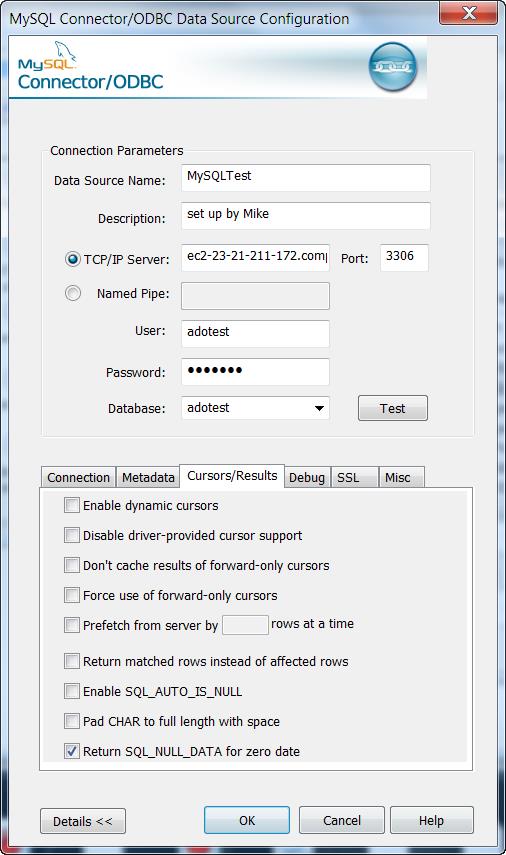
This will allow the count() to process correctly as well as view data programmaticaly. However , viewing the data in a grid or form component is not correct for the Date field that has a 0000-00-00 actual value.
(NOTE: this is for dBASE Plus 8 and dBASE PLUS 9 version 9.0.0.0)
If the actual data is
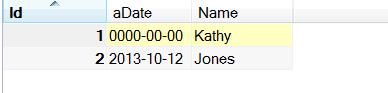
Viewing the notNullDates2 table in a browser in dBASE (with the odbc setting above) shows this …
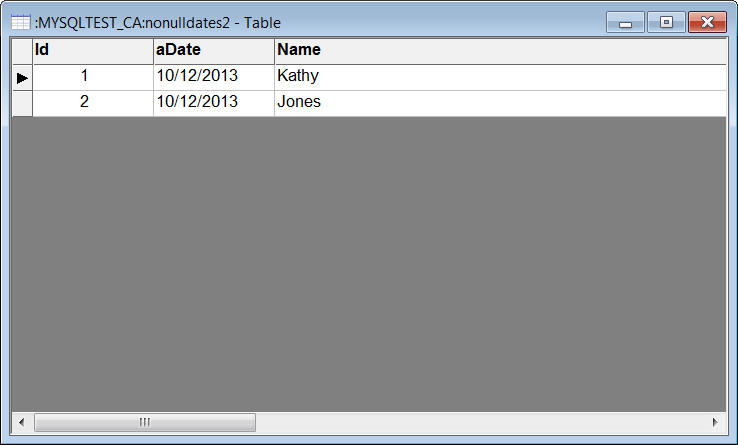
dBASE PLUS 9.1.0.0 has a fix for this issue …
This issue is occurring due to an error being encountered when our ADOField object attempts to retrieve the value for field aDate and aDate contains a zero date. The previous value (from record 2) is being left in the field buffer.
ADO use with Apache: Issue #1017 – get MAV instantiating an ado object in a web app.
Workaround:
This issue will occur on any 64 bit version of windows beginning with Vista.
The problem is due to the fact that Windows uses the environment variable ‘CommonProgramFiles(x86)’ to find the ADO DLL’s at runtime but Apache does not allow parenthesis in the names of any environment variables that it passes or creates for web apps that it executes.
It converts the parenthesis into underscores, for example: CommonProgramFiles_x86_.
The simplest solution for this is to have each web app that requires ADO access to create its own environment variable before it attempts to create any ADO objects.
Adding the following code near the beginning of these web apps will create the needed environment variable.
(be sure to adjust the specified path to the one matching the machine on which Apache is executing):
extern CLOGICAL SetEnvironmentVariable(CSTRING, CSTRING) kernel32 from “SetEnvironmentVariableA”
bResult = SetEnvironmentVariable(“CommonProgramFiles(x86)”, “C:/Program Files (x86)/Common Files”)
Here is a function: initEnv(), that will only call SetEnvironmentVariable() when necessary – from within a web app. This can be added to the web class (as a method) if desired and called before any ADO objects are created:
function initEnv()
local cEnvStr, cEnvVar, cEnvVarNoParens
if OSVersion() >= 6 // Windows Vista is version 6.0
if IsWow64() // test if running on 64 bit version of Windows
if type(“SetEnvironmentVariable”) # “FP”
extern CLOGICAL SetEnvironmentVariable(CSTRING, CSTRING) kernel32 from “SetEnvironmentVariableA”
endif
cEnvVar = “CommonProgramFiles(x86)”
cEnvVarNoParens = “CommonProgramFiles_x86_”
// check if correct env.var already exists and has a value
cEnvStr = getenv(cEnvVar)
if empty(cEnvStr)
// EnvVar with parens not found – so must create it
// check if modified env.var (without parens) already exists and has a value
cEnvStr = getenv(cEnvVarNoParens)
if empty(cEnvStr)
// cEnvVarNoParens not found – use default value for it
cEnvStr = “C:/Program Files (x86)/Common Files”
else
// otherwise cEnvVarNoParens exists and has a value
endif
// Create and set value of env.var (with parens)
bResult = SetEnvironmentVariable(cEnvVar, cEnvStr)
endif
endif
endif
return
function OSVersion
local cVersion
cVersion = OS()
return val(ltrim(substr(cversion,rat(” “,cVersion))))
function IsWow64
local lIsWow64
lIsWow64 = false
if type(“GetCurrentProcess”) # “FP”
extern CHANDLE GetCurrentProcess( CVOID ) kernel32
endif
if type(“IsWow64Process”) # “FP”
extern CLOGICAL IsWow64Process(CHANDLE, CPTR CLOGICAL) kernel32
endif
if type(“IsWow64Process”) = “FP”
// Make sure extern worked for retrieving this function pointer
// Because older versions of windows do not contain this function
// From MSDN, minimum supported operating systems are:
// Client OS’s: Win XP SP2, Vista
// Server OS’s: Windows Server 2003 with SP1, Windows Server 2008
IsWow64Process(GetCurrentProcess(), lIsWow64)
endif
return lIsWow64
In order for the above initEnv() to function correctly the following setting should be in the httpd.conf file (in any place – I put mine in the beginning) for Apache:
PassEnv CommonProgramFiles(x86)
This instructs Apache to pass the existing environment variable (CommonProgramFiles(x86) to any web apps as part of their default environment.
Apache will pass this env.variable, but renamed to: CommonProgramfiles_x86_
but it will have the needed path assigned to it which initEnv() will use.
Also when connecting to an ADO database it is best to use the .connectionString property when connecting to an external database in a web app.
for example …
this.adoQuery1 = new ADOQUERY(this)
with (this.adoQuery1)
connectionString = “
sql = “SELECT * FROM
active = true
requestLive = false
endwith
Code Completion: dComplete issue – varaibles are currently not checked for scope.
Workaround: We will be implementing soon a check for the scope of a variable to get the correct list of member for the Code Complete feature. For Example…
x = new Array()
Function NewObj
//test scope of new object
x = new query()
x. //Will show list of Array members instead of list of the query.
return
Code Completion: Parent reference does not produce a member list ..
in a simple form with a grid (or some other object) … in an event do .. this.parent to reference the form.
No member list is shown …
function GRID1_onOpen()
this.parent.
return
Code Completion: Variables defined in another file is not currently implemented for code completion
For example any objects defined in a file that is included with an #include or SET PROCEDURE to or in a Super classed file.
Code Completion: Field object not implemented for code completion
d = new database()
d.databasename = “DBASESAMPLES”
d.active = true
q = new query()
q.database = d
q.sql = “select * from Fish”
q.active = true
q.asdfasdf = q.rowset.fields[“name”].
at this point there is no member list.
[/toggle] [toggle title=”Miscellaneous”]Miscellaneous: Transform without 9s in numeric mask adds extra space.
in 2.8 ?Transform(0,’@$ ‘) … returns
$0
in dBASE Plus 8 this returns …
$ 0
unlesss (as a workaround) you add 9s as a mask…
?Transform(0,’@$ 99,999,999′) … this wil return …
$0 in both dBASE PLUS 8 and dBASE Plus 9
Miscellaneous: Adding a new event function can put the cursor in the wrong position.
In a form or a report … open it in the designer .. click an event wrench in the inspector to start a new function for that event.
the Source Editor will open but, the cursor may not be placed directly in the new function.
| 48 | Clients in system | |
| 32 | Sessions per client (3.5 and earlier 16 Bit, 32 Bit) | |
| 256 | Session per client (4.0 32 Bit) | |
| 32 | Open databases per session (3.5 and earlier 16 Bit, 32 Bit) | |
| 2048 | Open databases per session (4.0 32 Bit) | |
| 32 | Loaded drivers | |
| 64 | Sessions in system (3.5 and earlier 16 Bit, 32 Bit) | |
| 12288 | Sessions in system (4.0 32 Bit) | |
| 4000 | Cursors per session | |
| 16 | Entries in error stack | |
| 8 | Table types per driver | |
| 16 | Field types per driver | |
| 8 | Index types per driver | |
| 48K | Size of configuration (IDAPI.CFG) file | |
| 64K | Size of SQL statement (RequestLive=False) | |
| 4K | Size of SQL statement (RequestLive=True) | |
| 6K | Size of SQL statement (RequestLive=True) (4.01, 32 Bit) | |
| 16K | Record buffer size (SQL or ODBC) | |
| 31 | Table and field name size in characters | |
| 64 | Stored procedure name size in characters | |
| 16 | Fields in a key | |
| 3 | File extension size in characters | |
| 260 | Table name length in characters | |
| 260 | Path and file name length in characters | |
| 15 | Significant Digits |
| 127 | Tables open per system (4.0 and earlier 16 Bit32 Bit) | |
| 254 | Tables open per system (4.01 32 Bit) | |
| 64 | Record locks on one table (16Bit) per session | |
| 255 | Record locks on one table (32Bit) per session | |
| 255 | Records in transactions on a table (32 Bit) | |
| 512 | Open physical files (4.0 and earlier 16 Bit32 Bit) (DB, PX,MB, X??, Y??, VAL,TV) | |
| 1024 | Open physical files (4.01 32 Bit) (DB, PX,MB, X??, Y??, VAL,TV) | |
| 300 | Users in one PDOXUSRS.NET file | |
| 255 | Number of fields per table | |
| 255 | Size of character fields | |
| 2 | Billion records in a table | |
| 2 | Billion bytes in .DB (Table) file | |
| 10800 | Bytes per record for indexed tables | |
| 32750 | Bytes per record for non-indexed tables | |
| 127 | Number of secondary indexes per table | |
| 16 | Number of fields in an index | |
| 255 | Concurrent users per table | |
| 256 | Megabytes of data per BLOB field | |
| 100 | Passwords per session | |
| 15 | Password length | |
| 63 | Passwords per table | |
| 159 | Fields with validity checks (32 Bit) | |
| 63 | Fields with validity checks (16 Bit) | |
| 53 | Fields with Validity checks added at onetime | |
| 63 | Number of Sessions with Tables open on1 System |
| 256 | Open dBASE® tables per system (16 Bit) | |
| 350 | Open dBASE® tables per system (BDE™ 3.0 – 4.0,32 Bit) | |
| 512 | Open dBASE® tables per system (BDE™ 4.01, 32 Bit) | |
| 100 | Record locks on one dBASE® table (16 and 32 Bit) | |
| 100 | Records in transactions on a dBASE® table (32 Bit) | |
| 1 | Billion records in a table | |
| 2 | Billion bytes in .DBF (Table) file | |
| 4000 | Size in bytes per record (dBASE® 4) | |
| 32767 | Size in bytes per record (dBASE® for Windows®) | |
| 255 | Number of fields per table (dBASE® 4) | |
| 1024 | Number of fields per table (dBASE® for Windows®) | |
| 47 | Number of index tags per .MDX file | |
| 254 | Size of character fields | |
| 10 | Open master indexes (.MDX) per table | |
| 220 | Key expression length in characters |
You can create individual User Database Aliases in dBASE PLUS 9 when using the user’s UAC Paths in Vista or Windows 7.
In the User’s Plus.ini (or the applications
(For example c:users
Here is information from the dBASE PLUS 9 help file. Topic: ‘INI’
USERBDEALIASES Is a setting which allows a standard user to create a User Alias that gets saved to the user’s ini file.
A standard user will NOT be able to add a regular BDE Alias that gets stored in the BDE config file (idapi.cfg), unless the user is given administrator privileges OR is put in a custom user group that has full access to the BDE’s registry keys and the folder containing IDAPI.cfg.
The alternative is to deploy your app with one of the following:
– an .ini file containing User BDE Alias settings that the runtime will auto load when starting your application.
– a custom routine that your program runs to create on-the-fly any User BDE Aliases needed while your program is running.
To use the .ini file option, add lines similar to the following:
[UserBDEAliases]
0=SomeAlias
1=SomeODBCAlias
[SomeAlias]
Driver=DBASE
Options=PATH:C:SomeAliasFolder
[SomeODBCAlias]
Driver=
Options=
The dBASE IDE is able to use Unicode characters (like Chinese, Arabic etc…)
However, the .dbf and .db tables currently do not support these sets of characters. We are working on changing this for a future release. Please keep an eye on our website as we will be making many changes in the near future.
With ADO connections however, you can connect to external databases that use Unicode and other data types. Since ADO connections are outside of the BDE, it is not restricted by the limitations of the BDE.
You can find more detailed information from the help for ‘ADO’ under the ADO book in our online Help system.
https://www.dbase.com/help/9_2/Plus-en.htm
[/toggle] [toggle title=”INNO Setup error : Sorry can’t install this setup cancelled by user – When using Runtime/BDE “]Check for required dBASE Runtime files…” i get “Sorry can’t install this setup cancelled by user
Because of security issues people have found that you must use the [Run] section of inni to run the bde/runtime installer.
Try the following …
First leave the setting…
UninsHS= from the [dBASERuntime] section.
delete everything else under [dBASERuntime].
Instead you should use the [Run] section of inno (see the inno help under the RUN section).
This is where extra .exe’s are run at the end of the app install.
After removing the [dBASERuntime] section there will be additional code that is no longer necessary so remove ..
under
Then add the following …
(For an example... this is using PLUS 8.1.3.0 Runtime installers)
under ...
[Files]; -----------------------------------------------------
; dBASE Runtime Installer – put it in {tmp} dir
Source: "
; -----------------------------------------------------
; Manifest file for runtime:
Source: "
; Manifest file for BDE:
Source: "
Under…
[Run] ; This is a Silent install of runtime suppresses the runtime install display, ...Filename: {tmp}\PLUS813Runtime-b2345_EN.exe; Parameters: "-s -a Runtime=""{pf}\dBASE\Plus\Runtime"" BDE=""{cf}\Borland\BDE"" Silent -sr"; StatusMsg: "Installing dBASE Runtime and BDE..."; Flags: runascurrentuser; WorkingDir: {tmp};
= = = = = = = = = = = = FULL EXAMPLE OF .ISS THAT INSTALLS A SIMPLE HI.EXE AND THE RUNTIME = = = = = = = = = = = = =
[_TopOfScript] ; This is a Innoscript generated by dBASE PLUS Project Explorer [_Project] ProjectNr=1.0.0.0
[Files]
; -----------------------------------------------------
; dBASE Runtime Installer – put it in {tmp} dir
Source: "C:\RuntimeInstaller\PLUS813Runtime-b2345_ALL.exe"; DestDir: "{tmp}"; Flags: ignoreversion deleteafterinstall
Source: RuntimeBDETest.exe; DestDir: {app}; Flags: IgnoreVersion
[UninstallDelete] Type: files; Name: Filename: {app}\RuntimeBDETest.ini
[_EndOfScript] ; © dBase Portions by Jonny Kwekkeboom © 2002-2014procedure InitializeWizard();
begin
FinishedInstall:= false
end;
procedure DeInitializeSetup( );
var ErrorCode: Integer;
begin
if FinishedInstall then
#if VER >= 0x05000100
ShellExec('open',ExpandConstant('{group}'),'',ExpandConstant('{group}'), SW_SHOWNORMAL, ewNoWait, ERRORCODE);
#else
InstShellExec(ExpandConstant('{group}'), '', '', SW_SHOWNORMAL, ERRORCODE);
#endIf
end;
function InitializeSetup(): Boolean;
var S: String;
begin
(** Create a Mutex so we can not double call this Setup.exe file **)
S:='{#AppName}';
Result:= true;
if CheckForMutexes(S+'_SetupMutex')=false
then Createmutex(S+'_SetupMutex')
else Result:=False;
end;